


What is The Forex Exchanger?
The Forex Exchanger is a fully automated MetaTrader 5 Expert Advisor designed for multi-currency Forex trading on the M30 timeframe, supporting up to 28 major and cross-currency pairs through a single configurable trading system. The EA allows traders to monitor the complete Forex portfolio or select specific instruments such as EURUSD and GBPUSD using a customizable symbol list. Its trading algorithm incorporates balance-based or equity-based lot sizing, adjustable entry sensitivity, currency exposure restrictions, and automatic Take Profit management to coordinate trading activity across multiple currency pairs. The system also supports broker-specific symbol prefixes and suffixes, providing compatibility with different MetaTrader 5 trading environments.
Vendor website: http://mql5.com/en/market/product/76773

Original price: $1299
ForexEAshop price: $19 (You Save 99%)
Key Takeaways
- The Forex Exchanger is a MetaTrader 5 multi-currency Expert Advisor designed for M30 trading, supporting up to 28 Forex pairs with customizable symbol selection, automatic lot sizing, selective entry filtering, and configurable Take Profit management.
- The automated Forex trading robot combines overbought and oversold market analysis, currency exposure restrictions, Grid-based basket management, and adjustable risk parameters to coordinate trading opportunities across major and cross-currency pairs.
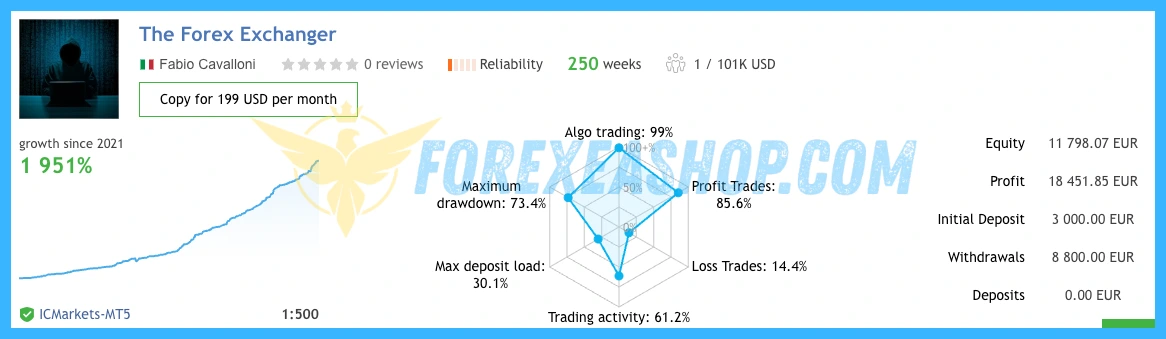
- Official marketplace reviews and developer-linked live trading signals provide useful performance references, while cumulative basket exposure, averaging risk, floating equity drawdown, leverage, and broker execution conditions remain essential considerations before live deployment.
The Forex Exchanger Features
- Used on platform: Meta Trader 5.
- Currency pairs: 28 forex pairs.
- Time frame: M30.
- Minimum deposit: 500$.
- Recommend use leverage: 1:100 or higher.
- Expert Advisor trading automated 100%.
🚀 Recommend Use VPS Forex
To keep Experts Advisor running smoothly 24/7, use a quality Forex VPS. Optimize trading efficiency, no worries about interruptions!
Register VPS NowThe Forex Exchanger Reviews
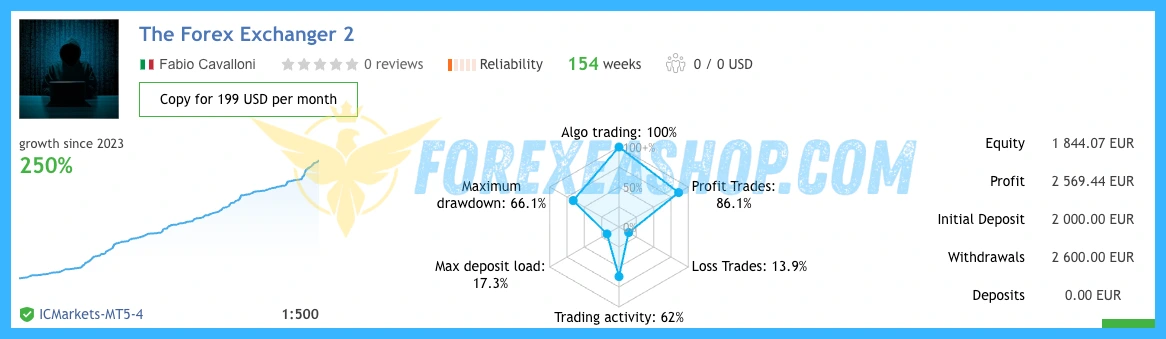
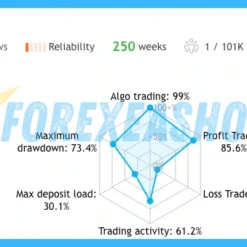
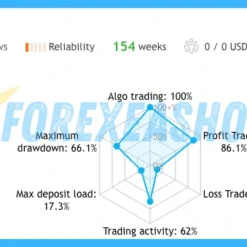
The Forex Exchanger offers a multi-currency trading approach that should be evaluated through portfolio-level performance, individual currency-pair profitability, maximum equity drawdown, and simultaneous exposure to correlated currencies. Its configurable entry sensitivity and currency-direction restrictions provide useful risk management options, but their effectiveness depends on market conditions, position sizing, and the selected trading parameters. Independently verified long-term live trading results for this exact MT5 configuration have not been established, making realistic backtesting and forward testing essential before relying on historical performance claims.

Signal EA on link: Click to view

Signal EA on other link: Click to view
Why should you use The Forex Exchanger?
The Forex Exchanger provides an automated Forex trading solution for traders seeking exposure to multiple currency pairs without managing separate Expert Advisors for every instrument. Its flexible configuration allows users to customize the trading portfolio, adjust entry behavior, and control position sizing according to their account balance and trading objectives. The combination of currency exposure filtering, automated Take Profit adjustments, and broker symbol compatibility makes the system particularly relevant to traders managing diversified Forex strategies.
- 28 Forex Pair Trading Support: Automatically monitors and trades up to 28 major and cross-currency pairs, allowing traders to access multiple Forex market opportunities through one Expert Advisor.
- Customizable Currency Pair Selection: Supports a comma-separated symbol list that allows users to restrict automated trading to preferred instruments such as EURUSD, GBPUSD, or other supported Forex pairs.
- Automatic Lot Size Management: Calculates trading volume according to account balance or equity and the configured risk factor, helping traders adjust position sizing as their account value changes.
- Advanced Entry Sensitivity Control: Includes an adjustable entry parameter that can delay market execution while the algorithm virtually tracks potential trades, seeking more favorable entry prices during extended market movements.
- Currency Exposure Protection: Restricts new trades when existing positions already create excessive directional exposure to a particular currency, helping manage concentration across correlated Forex pairs.
- Flexible Take Profit and Broker Compatibility: Supports automatic Take Profit adjustments, individual symbol overrides, and broker-specific prefixes or suffixes for more precise multi-currency trade management.
Trading Specifications
Recommended settings and parameters to pay attention to from developers and experts:
| Features | Type |
|---|---|
| Trading platform | MetaTrader 5 (MT5) |
| Currency pairs | 28 forex pairs |
| Time frame | M30 |
| Minimum deposit | 500$ |
| Recommend leverage | 1:100 or higher |
| Setup files | Default setting |
| Product type | Without/Have DLL / Unlimited / Free 1 Year Updates |
| Recommend Broker | Exness Broker / ICMarket Broker / Tickmill / Roboforex |
| Virtual Private Server (VPS) | FXVM Forex VPS provides reliable Windows VPS solutions optimized for MT4/MT5, helping keep Expert Advisors and automated trading platforms online 24/7 |
How to install and run the The Forex Exchanger Trading Bot in Metatrader 5?
- Open the Metatrader 5 platform
- From the top menu, click on “File”
- Now click on “Open Data Folder”
- Open the “MQL5” folder
- Open the “Experts” folder
- Copy the The Forex Exchanger v1.44.ex5 file here
- Then close and restart the MT5 platform
- Attach the Expert Advisor to the chart
Now, you are ready to start using the The Forex Exchanger MT5 v1.44!
If you have any questions regarding EA installation, you can view the information in the Help Center to assist you in installing the EA: Click to view
The Forex Exchanger Download Package
Link download The Forex Exchanger MT5 v1.44 will be sent to your email after purchase.
Installation guide (if any) will be sent immediately via email after your purchase, or you can directly download it from the website, under the section: My account -> Download.
+ Expert Advisor Download :
- The Forex Exchanger v1.44.ex5
- Unlimited / NoDLL / Build New
- Free 1 Year Updates (If there is a new update, please check in the download on the forexeashop website or you can contact us via Email or Telegram Lucas Jason and provide proof of purchase, we will send you the update)
Conclusion
The Forex Exchanger combines automated trading across 28 Forex pairs, customizable instrument selection, dynamic lot sizing, advanced entry filtering, and currency exposure management within one MetaTrader 5 Expert Advisor. Its multi-currency architecture provides flexibility for traders seeking broader Forex market participation while maintaining control over individual symbols and position management settings. The supplied specifications recommend a minimum deposit of 500 dollars and leverage of 1:100 or higher, although trading multiple correlated currency pairs may require additional free margin and conservative risk allocation. Explore the available configuration options, evaluate the complete portfolio using realistic historical data, and begin with demo trading before deploying the EA on a live account.
Frequently Asked Questions (FAQs)
What platform does The Forex Exchanger use?
The Forex Exchanger is developed for MetaTrader 5 and supports automated trading across a portfolio of up to 28 Forex currency pairs.
Which Forex pairs can the EA trade?
The system supports 28 major and cross-currency pairs involving EUR, USD, GBP, JPY, CHF, AUD, CAD, and NZD. Traders can select individual instruments or activate the complete portfolio.
What timeframe is recommended?
M30 is the recommended timeframe for the supplied trading configuration. Traders should test the EA using the intended broker environment and verify that all required currency symbols are available.
Can I trade only EURUSD and GBPUSD?
Yes. The custom symbol parameter accepts a comma-separated list, allowing traders to enter EURUSD,GBPUSD and restrict trading to those two instruments.
What happens if the custom symbol field is empty?
An empty custom symbol field activates the default portfolio of 28 Forex pairs. Traders should verify this setting before enabling automated trading to avoid unintended market exposure.
How does automatic lot sizing work?
The EA can calculate trading volume using account balance or equity together with the selected risk factor. Traders should confirm the calculated lot size before live execution because actual exposure depends on the selected parameters.
What is the minimum deposit required?
The supplied minimum deposit is 500 dollars, although a larger balance may be appropriate when trading several currency pairs simultaneously. Account size should be evaluated against cumulative position exposure and potential basket drawdown.
What leverage is recommended?
Leverage of 1:100 or higher is recommended for the specified configuration. Higher leverage increases available margin but does not protect the account from losses.
Does The Forex Exchanger use Grid trading?
The Forex Exchanger supports additional entries into existing trading baskets and can adjust the average entry price as market conditions develop. This averaging approach can increase floating drawdown when currency trends move persistently against open positions.
How does the entry sensitivity parameter work?
The entry sensitivity setting adjusts how selectively the algorithm identifies trading opportunities. Higher values can cause the EA to virtually track potential entries and wait for more favorable market conditions before opening positions.
What is currency exposure protection?
Currency exposure protection limits new positions when existing trades already create excessive exposure to the same currency and direction. For example, several EUR buying positions across different pairs may prevent additional trades that increase the same directional exposure.
Can traders customize Take Profit levels?
Yes. Individual currency pairs can receive customized Take Profit distances, such as EURUSD:100 or GBPUSD:200, while leaving the parameter empty allows automatic adjustment.
Does the EA include a hard Stop Loss?
The official product settings include an optional account-level hard Stop Loss percentage that can trigger the closure of open positions when its configured loss threshold is reached. Traders should verify this protection because a disabled or excessively high threshold can expose the account to substantial drawdown.
Does the EA work with broker symbol suffixes?
Yes. The system supports custom symbol prefixes and suffixes, allowing compatibility with broker naming formats such as EURUSDx or .EURUSD.
Is a VPS recommended?
Yes. A reliable VPS helps maintain continuous MetaTrader 5 operation, automated trade monitoring, and basket management across multiple Forex currency pairs.
Are profitable trading results guaranteed?
No. Historical trading signals and favorable customer reviews do not guarantee future profitability, particularly when averaging strategies experience extended adverse currency movements.
Shopping Guide and Important Information
We Accept Payment: Cryptocurrency, USDT, Binance Pay, Skrill, Paypal: Click to view
More payment methods please contact: Email or Telegram Admin.
Cryptocurrency, PayPal: Our website checkout system automated.
Memo: Your email + EA name
EA will be send to your email ASAP. The download link will be sent to your email within 5 minutes after the order is confirmed.
Some EAs will need to wait a few hours to up to 12 hours to receive the download link.
Please read and agree to the information below before purchasing our products:
Beginner traders should research and learn about trading before using any EAs.
Please make sure you understand the risks involved with trading and that past performance is no guarantee for future results. (EA could also make losses).
The product does not guarantee profits and demands resilience, patience, and a positive attitude in forex trading.
Before use, please test the EA on a demo account first.
Happy trading!