
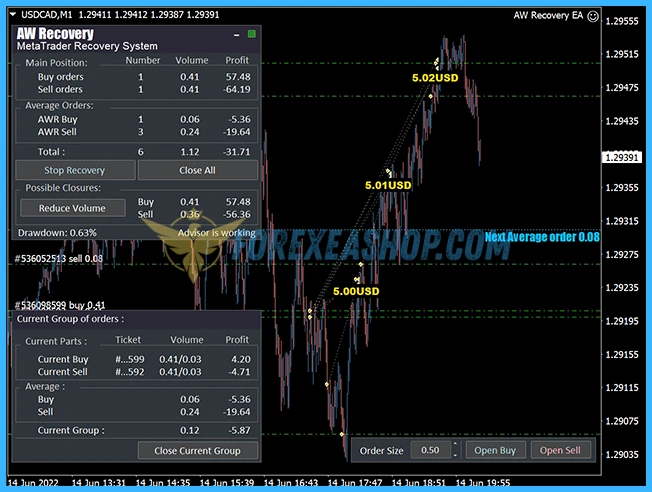
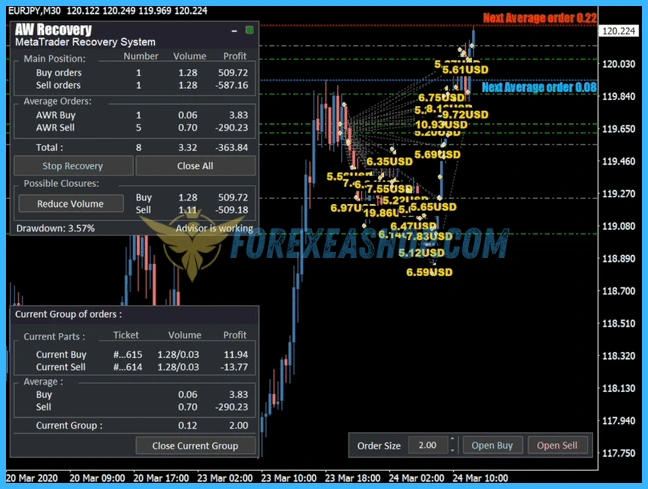
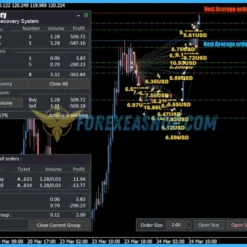
What is AW Recovery EA?
AW Recovery EA is a specialized automated recovery system developed for MetaTrader platforms, designed to manage and reduce losing positions with precision and controlled risk. This Expert Advisor works by locking unprofitable trades, splitting them into smaller parts, and closing each portion strategically to minimize drawdown impact. Instead of relying on aggressive grid or martingale techniques, it applies a structured recovery algorithm combined with trend filtering and partial closing logic. The system can also disable other Expert Advisors on the same symbol to take full control during recovery phases. By automating complex loss management processes, it provides traders with a professional tool to stabilize and recover trading accounts.
Vendor website: https://www.mql5.com/en/market/product/49453

Original price: $195
ForexEAshop price: $19 (You Save 90%)
Who’s Behind the Creation?
This Expert Advisor is developed by Alexander Nechaev, who brings over 9 years of experience forex ea robot on MQL5 to the table. He has worked on several notable products, including AW Scalping Dynamics EA, AW Trend Predictor, AW Double Grids MT5, and the highly successful AW Recovery EA, which stands out as his top-performing creation.
Key Takeaways
- AW Recovery EA is a specialized Forex recovery Expert Advisor for MetaTrader 4 that focuses on drawdown management by locking losing trades, splitting positions into smaller parts, and applying partial close algorithms with trend filtering to achieve controlled risk recovery without using martingale or grid strategies.
- It enhances trading stability by reducing deposit load, automating loss management, and coordinating with other trading systems through smart EA control, making it ideal for multi strategy portfolios, account recovery scenarios, and traders seeking disciplined risk management in volatile Forex market conditions.
- A professional MT4 risk management tool aligned with modern algorithmic trading practices, featuring flexible configuration, adaptive recovery logic, VPS compatibility, and advanced capital protection techniques that support long term account sustainability and efficient loss mitigation.
AW Recovery EA Features
- Used on platform: Meta Trader 4.
- Currency pairs: GBPJPY, USDCAD, EURJPY or forex pairs other.
- Time frame: M1, M30, H1.
- Minimum deposit: $100.
- Recommend use leverage: 1:100 or higher.
- Expert Advisor trading automated 100%.
- Restores a losing position in parts, allowing you to work with a lower deposit load.
- AW Recovery can accompany other advisors and turn them off at the right time.
- EA automatically locks the position, resets TP and SL levels and deletes pending orders.
- EA resets TakeProfit and StopLoss levels for all processed orders and deletes pending orders with corresponding identifiers.
- EA closes all processed profitable orders in order to use their profit to cover part of unprofitable orders and reduce the total position volume.
- EA locks a losing position by opening a locking order.
🚀 Recommend Use VPS Forex
To keep Experts Advisor running smoothly 24/7, use a quality Forex VPS. Optimize trading efficiency, no worries about interruptions!
Register VPS NowAW Recovery EA Reviews
The Expert Advisor is a system designed to recover unprofitable positions.The author’s algorithm locks a losing position, splits it into many separate parts, and closes each of them separately. Easy setup, delayed launch in case of drawdown, locking, disabling other Expert Advisors, averaging with trend filtering and partial closing of a losing position are built into one tool.


It is the use of closing losses in parts that allows you to reduce losses with a lower deposit load, which ensures safer work with losses, in contrast to grid strategies that close orders only in whole groups.
This Expert Advisor works by locking unprofitable trades, splitting them into smaller parts, and closing each portion strategically to minimize drawdown impact. Instead of relying on aggressive grid or martingale techniques, it applies a structured recovery algorithm combined with trend filtering and partial closing logic. The system can also disable other Expert Advisors on the same symbol to take full control during recovery phases. By automating complex loss management processes, it provides traders with a professional tool to stabilize and recover trading accounts.
Why should you use AW Recovery EA?
AW Recovery EA is built for traders who need an intelligent and disciplined solution to handle drawdowns and recover losing trades effectively. It offers a unique approach to loss management that focuses on reducing risk exposure while maintaining flexibility and control. This makes it particularly valuable for traders running multiple strategies or managing complex portfolios.
- Partial Loss Recovery System: Breaks losing positions into smaller parts and closes them gradually, reducing deposit load and improving recovery efficiency
- Smart Locking Mechanism: Locks losing trades with opposite positions to prevent further drawdown while recovery logic is activated
- Automated EA Control: Can disable other Expert Advisors on the same symbol to avoid conflicts and ensure focused recovery execution
- Trend Filtering Integration: Uses market direction analysis to align recovery trades with prevailing trends for higher probability outcomes
- Flexible Configuration Settings: Allows customization of lot size, averaging steps, multipliers, and recovery ratios to suit different trading strategies
- Advanced Risk Management Tools: Includes protective features such as TP and SL reset, pending order cleanup, and controlled exposure handling
Trading Specifications
Recommended settings and parameters to pay attention to from developers and experts:
| Features | Type |
|---|---|
| Trading platform | MetaTrader 4 (MT4) |
| Currency pairs | Any pairs |
| Time frame | H1. |
| Minimum deposit | $100 |
| Recommend leverage | 1:100 or higher |
| Setup files | Have setfiles |
| Product type | Without DLL / Unlimited / Free 1 Year Updates |
| Recommend Broker | Exness Broker / ICMarket Broker / Tickmill / Roboforex |
| Virtual Private Server (VPS) | FXVM (Lite VPS, Basic VPS, Advanced VPS, High Freq VPS) |
How to install and run the AW Recovery EA Trading Bot in Metatrader 4?
- Open the Metatrader 4 platform
- From the top menu, click on “File”
- Now click on “Open Data Folder”
- Open the “MQL4” folder
- Open the “Experts” folder
- Copy the AW Recovery EA v3.30.ex4 file here
- Then close and restart the MT4 platform
- Attach the Expert Advisor to the chart
Now, you are ready to start using the AW Recovery EA MT4 v3.30 With Setfiles!
Manual: Click to view
If you have any questions regarding EA installation, you can view the information in the Help Center to assist you in installing the EA: Click to view
AW Recovery EA Download Package
Link download AW Recovery EA MT4 v3.30 With Setfiles will be sent to your email after purchase.
Installation guide (if any) will be sent immediately via email after your purchase, or you can directly download it from the website, under the section: My account -> Download.
+ Expert Advisor Download :
- AW Recovery EA v3.30.ex4
- Unlimited / NoDLL / Build New / Presets
- Free 1 Year Updates (If there is a new update, please check in the download on the forexeashop website or you can contact us via Email or Telegram Lucas Jason and provide proof of purchase, we will send you the update)
+ Presets :
AWRecovery m5.set
+ Indicators :
AW_Reso_TrPrEA.ex4
Reso_New.ex4
Conclusion
AW Recovery EA stands out as a powerful recovery-focused trading tool designed for MetaTrader users who want to manage drawdowns with precision and discipline. Its structured approach to splitting and closing losing positions offers a safer alternative to traditional high-risk recovery methods. By combining automation, flexibility, and intelligent risk control, it helps traders regain stability in challenging market conditions. This EA is especially useful for those running multiple systems or needing a dedicated recovery solution. If your goal is to protect capital and recover losses efficiently, this system is a valuable addition to your trading toolkit.
Frequently Asked Questions (FAQs)
What is the main purpose of AW Recovery EA?
It is designed to recover losing trades by splitting positions and closing them gradually with controlled risk.
Can AW Recovery EA work with other Expert Advisors?
Yes, it can either work alongside other EAs or automatically disable them when recovery mode is activated.
Does AW Recovery EA use martingale strategies?
No, it avoids aggressive martingale approaches and focuses on structured partial recovery techniques.
Is AW Recovery EA suitable for all currency pairs?
It works on a single symbol at a time, so it must be attached separately to each pair you want to manage.
Do I need to configure settings manually?
Basic setup is simple, but adjusting parameters like lot size and averaging steps will improve performance based on your strategy.
Shopping Guide and Important Information
We Accept Payment: Cryptocurrency, USDT, Binance Pay, Skrill, Paypal: Click to view
More payment methods please contact: Email or Telegram Admin.
Cryptocurrency, PayPal: Our website checkout system automated.
Memo: Your email + EA name
EA will be send to your email ASAP. The download link will be sent to your email within 5 minutes after the order is confirmed.
Some EAs will need to wait a few hours to up to 12 hours to receive the download link.
Please read and agree to the information below before purchasing our products:
Beginner traders should research and learn about trading before using any EAs.
Please make sure you understand the risks involved with trading and that past performance is no guarantee for future results. (EA could also make losses).
The product does not guarantee profits and demands resilience, patience, and a positive attitude in forex trading.
Before use, please test the EA on a demo account first.
Happy trading!