



HEDGE ZONE EA is a fully automated Expert Advisor built for trading the EURUSD pair on the MetaTrader 5 platform, optimized for the H1 timeframe. Engineered for precision and control, it leverages a dynamic hedging strategy that adjusts to market movements while actively minimizing drawdowns. Unlike EAs that rely on risky tactics like martingale or grid trading, EA focuses on stability, risk mitigation, and consistent performance. It’s a smart choice for traders who value disciplined trade management and steady results in changing market conditions.



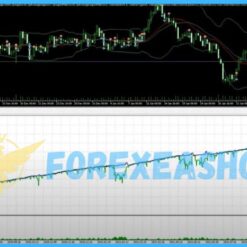
HEDGE ZONE EA MT5
19 $
HEDGE ZONE EA is a fully automated Expert Advisor built for trading the EURUSD pair on the MetaTrader 5 platform, optimized for the H1 timeframe. Engineered for precision and control, it leverages a dynamic hedging strategy that adjusts to market movements while actively minimizing drawdowns. Unlike EAs that rely on risky tactics like martingale or grid trading, EA focuses on stability, risk mitigation, and consistent performance. It’s a smart choice for traders who value disciplined trade management and steady results in changing market conditions.
Instant Digital Delivery
Get your EA software delivered instantly to your email after purchase.
Instant Activation
Your EA will be activated immediately after purchase. No waiting time!
Updates & Support
Free 1 future updates for all EAs, Fast, dedicated customer support whenever you need help.
TrustedSite
What is HEDGE ZONE EA?
Vendor website: Private

Original price: $549
ForexEAshop price: $19 (You Save 95%)
Why should you use HEDGE ZONE EA?
HEDGE ZONE EA is a smart, fully automated trading solution for MetaTrader 5, built specifically for EURUSD on the H1 timeframe. It uses a zone-based dynamic hedging strategy that opens calculated counter-positions at key market levels, effectively balancing risk and minimizing drawdowns without relying on martingale or grid methods. Designed for traders who value consistency and capital preservation, this EA offers robust performance even during volatile market conditions.
Key Takeaways:
- HEDGE ZONE EA uses a dynamic, zone-based hedging strategy to manage drawdowns and reduce risk without martingale or grid tactics.
- Optimized for EURUSD on the H1 time frame, offering stable and predictable performance with full risk control and trade customization.
- Ideal for low-spread ECN and prop firm accounts, delivering consistent results with built-in trailing, break-even, and partial close logic.
Please read this note carefully before purchasing and using EA with DLL: If you know how to use DLL from the old terminal version and how to disable automatic updates in Metatrader, you can buy it. Or if you do not know how to install, visit Help Center, we will show you the instructions for installing EA with DLL. Don’t worry, if you see it but still cannot do it successfully, please contact Admin Lucas Jason to support you with the installation via AnyDesk.
HEDGE ZONE EA Features
- Used on platform: Meta Trader 5.
- Curency pairs: EURUSD.
- Time frame: H1.
- Minimum deposit: 500$.
- Recommend use leverage: 1:100 or higher.
- Expert Advisor trading automated 100%.
- Uses a zone-based hedging system to open counter-positions at key levels.
- Prioritizes capital safety with controlled risk. No exponential lot sizing or risky recovery techniques.
🚀 Recommend Use VPS Forex
To keep Experts Advisor running smoothly 24/7, use a quality Forex VPS. Optimize trading efficiency, no worries about interruptions!
Register VPS NowHEDGE ZONE EA Reviews
Optimized for the most liquid forex pair, EURUSD, HEDGE ZONE EA delivers smoother execution and more reliable results. It features full customization options lot sizing, stop-loss and take-profit levels, max trades, and hedge zones giving you both control and flexibility. With 24/5 active trade monitoring, it also includes intelligent features like break-even logic, trailing stops, and partial closures to enhance trade outcomes.
Perfect for use on fast, low-spread ECN accounts including prop firm setups HEDGE ZONE EA stands out as a non-aggressive, high-precision Expert Advisor built for long-term profitability and dependable risk management in any market environment.
Trading Specifications
Recommended settings and parameters to pay attention to from developers and experts:
| Features | Type |
|---|---|
| Trading platform | MetaTrader 5 (MT5) |
| Currency pairs | EURUSD |
| Time frame | H1 |
| Minimum deposit | 500$ |
| Recommend leverage | 1:100 or higher |
| Setup files | Default setting |
| Product type | Have DLL / Unlimited / Free 1 Year Updates |
| Recommend Broker | Exness Broker / ICMarket Broker / Tickmill / Roboforex |
| Virtual Private Server (VPS) | FXVM (Lite VPS, Basic VPS, Advanced VPS, High Freq VPS) |
How to install and run the HEDGE ZONE EA Trading Bot have DLL in Metatrader?
- Some EA has DLL from unknown developers will be mistakenly labeled as malicious and removed by Defender or Antivirus.
- So you need turn off antivirus or windows defender protect to download and use.
- You should use VPS and you turn off antivirus or windows defender protect on VPS to use.
- Next time you reopen the VPS, you don’t need to do anything about it anymore, Without DLL, there is no need to disable it.
Please read this note carefully before purchasing and using EA with DLL: If you know how to use DLL from the old terminal version and how to disable automatic updates in Metatrader, you can buy it. Or if you do not know how to install, visit Help Center, we will show you the instructions for installing EA with DLL. Don’t worry, if you see it but still cannot do it successfully, please contact Admin Lucas Jason to support you with the installation via AnyDesk.
HEDGE ZONE EA Downloads
Link download HEDGE ZONE EA MT5 will be sent to your email after purchase.
Installation guide (if any) will be sent immediately via email after your purchase, or you can directly download it from the website, under the section: My account -> Download.
+ Expert :
- HEDGE ZONE EA.ex5
- Unlimited / DLL / Build 4885 MT5
- Free 1 Year Updates (If there is a new update, please check in the download on the forexeashop website or you can contact us via Email or Telegram Lucas Jason and provide proof of purchase, we will send you the update)
Shopping Guide and Important Information
We Accept Payment: Cryptocurrency, USDT, Binance Pay, Skrill, Paypal: Click to view
More payment methods please contact: Email or Telegram Admin.
Cryptocurrency, PayPal: Our website checkout system automated.
Memo: Your email + EA name
EA will be send to your email ASAP. The download link will be sent to your email within 5 minutes after the order is confirmed.
Some EAs will need to wait a few hours to up to 12 hours to receive the download link.
Please read and agree to the information below before purchasing our products:
Beginner traders should research and learn about trading before using any EAs.
Please make sure you understand the risks involved with trading and that past performance is no guarantee for future results. (EA could also make losses).
The product does not guarantee profits and demands resilience, patience, and a positive attitude in forex trading.
Before use, please test the EA on a demo account first.
Happy trading!

David Rodriguez
Senior Forex Analyst at ForexEAshop
David Rodriguez has over 8 years of experience in forex trading and market analysis. He specializes in institutional trading strategies and has helped thousands of traders improve their performance through his educational content and trading tools.
VIP Membership • ForexEAshop
Unlock Free & Unlimited Store Access
Join ForexEAshop VIP and get unrestricted access to current and future products. Lock in your membership rate now before prices increase as the product library grows.
Instant access
Future updates
Priority support
Related products

Out of stock
Forex Robot (EA)
19 $


Forex Robot (EA)
24 $


Out of stock
Forex Robot (EA)
(1)
19 $

Forex Robot (EA)
(1)
19 $

Out of stock
Forex Robot (EA)
(1)
19 $


MetaTrader 4
(3)
19 $

Out of stock
Forex Robot (EA)
(1)
19 $


Forex Robot (EA)
19 $