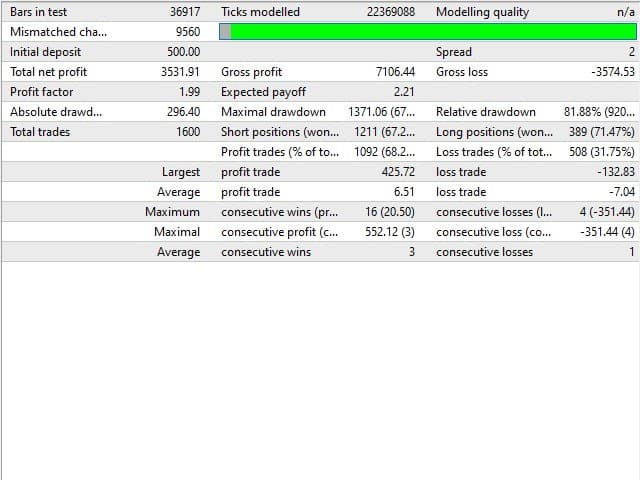
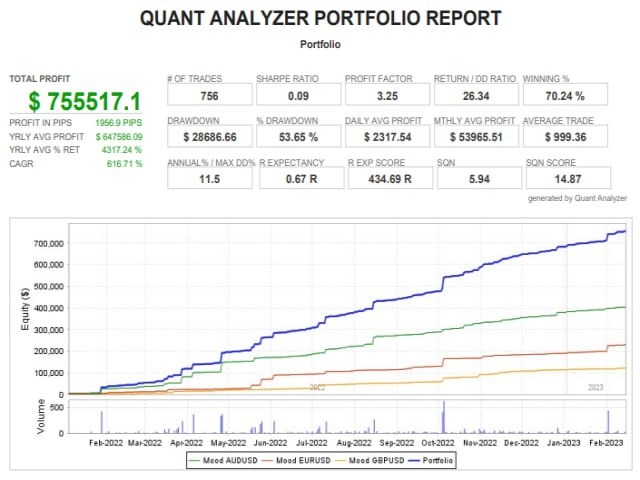
What is Mood EA?
Mood EA is Expert Advisor works on the Momentum indicator, which is a leading indicator, work on Meta Trader 4 platform. To enter a position, the advisor uses the oversold or overbought conditions of this indicator, catching the “mood” of traders.
Vendor website: https://www.mql5.com/en/market/product/58924

Original price: $50
ForexEAshop price: $19 (You Save 70%)
Key Takeaways
- The Mood EA Expert Advisor operates on the Momentum indicator, utilizing oversold or overbought conditions to gauge trader sentiment.
- It is designed to work on MetaTrader 4 platform with a focus on currency pairs such as EURCAD, EURUSD, GBPAUD, and others, on a M15 time frame.
- It is recommended to use VPS (Virtual Private Server) for optimal performance of the Mood EA Expert Advisor.
Mood EA Setting / Feature
- Used on platform: Meta Trader 4
- Currency pairs: EURCAD, EURUSD, GBPAUD, GBPCAD, GBPCHF, GBPUSD, NZDUSD, USDCHF, XAUUSD
- Time frame: M15.
🚀 Recommend Use VPS Forex
To keep Experts Advisor running smoothly 24/7, use a quality Forex VPS. Optimize trading efficiency, no worries about interruptions!
Register VPS NowMood EA Review


How to install and run the Mood EA Trading Bot in Metatrader 4?
- Open the Metatrader 4 platform
- From the top menu, click on “File”
- Now click on “Open Data Folder”
- Open the “MQL4” folder
- Open the “Experts” folder
- Copy the Mood EA.ex4 file here
- Then close and restart the MT4 platform
- Attach the Expert Advisor to the chart
Now, you are ready to start using the Mood EA MT4 Without DLL!
If you have any questions regarding EA installation, you can view the information in the Help Center to assist you in installing the EA: Click to view
Parameters:
Open new series – on / off beginning of a new seri
Start lots – start lot.
Trade Buy – allow the adviser to buy.
Trade Sell – allow the adviser to sell.
Support manual orders – allowed or not for EA manage manual orders.
Use hedge – allow the adviser to trade both direction buy and sell. If off only one trade direction.
Use Money Management – on / off use of automatic lot calculation.
Autolot. Free margin for each 0.01 lot – the amount of free margin for opening every 0.01 lots.
Lot miltiplier – lot multiplier for the following orders.
TP – take profit, in pips.
SL – stop loss, in pips from the first order.
Trail Start – activation of a trailing stop.
Trail Step – distance from the price when activating a trailing stop.
DD Reduction Algoritm – drawdown reduction algorithm it when last order with profit will be close with first order series with loss.
Number order for DD Reduction Algoritm – from which order the drawdown reduction algorithm is activated.
Percent profit for DD Reduction Algoritm – percentage of profit when closing orders in the drawdown reduction mode.
Magic – is a special number that the EA assigns to its orders.
Fix distance – fixed distance between orders
Order dinamic distance – from which order will the dynamic distance be applied in order.
Dinamic distance start – the starting value for the dynamic distance.
Distance multiplier – the dynamic distance multiplier.
Start, End hour – time for opening the first order.
Maximum Lot – maximum lot.
Maximum spread – the maximum spread for the adviser.
Mom_Period – period of the Momentum indicator.
Up Level – the reading of the Momentum indicator above which the EA sells.
Down Level – the reading of the Momentum indicator below which the advisor buys.
Mood EA Download
Link download Mood EA MT4 Without DLL will be sent to your email after purchase.
Installation guide (if any) will be sent immediately via email after your purchase, or you can directly download it from the website, under the section: My account -> Download.
+ Expert Advisor Download :
- Mood EA.ex4
- Unlimited / NoDLL / Build New
- Free 1 Year Updates (If there is a new update, please check in the download on the forexeashop website or you can contact us via Email or Telegram Lucas Jason and provide proof of purchase, we will send you the update)
Shopping Guide and Important Information
We Accept Payment: Cryptocurrency, USDT, Binance Pay, Skrill, Paypal: Click to view
More payment methods please contact: Email or Telegram Admin.
Cryptocurrency, PayPal: Our website checkout system automated.
Memo: Your email + EA name
EA will be send to your email ASAP. The download link will be sent to your email within 5 minutes after the order is confirmed.
Some EAs will need to wait a few hours to up to 12 hours to receive the download link.
Please read and agree to the information below before purchasing our products:
Beginner traders should research and learn about trading before using any EAs.
Please make sure you understand the risks involved with trading and that past performance is no guarantee for future results. (EA could also make losses).
The product does not guarantee profits and demands resilience, patience, and a positive attitude in forex trading.
Before use, please test the EA on a demo account first.
Happy trading!