What is SentinelAI?
SentinelAI is a fully automated Forex trading system developed for MetaTrader 4, specifically optimized for major currency pairs such as EURUSD and GBPUSD on the M5 timeframe. The EA combines price action analysis, mean reversion strategies, and AI-driven market analytics to identify potential trend reversals and capitalize on short-term market inefficiencies with improved precision. It features Deep Learning powered trend, momentum, and volatility filters that help traders avoid weak market conditions and focus on higher-probability trading opportunities. The system also includes automatic GMT adjustment, advanced news filtering, and stock market crash protection to improve execution stability during volatile market events. With its one chart setup capability, traders can manage multiple symbols from a single MT4 chart while maintaining fully automated trading performance.
Vendor website: https://www.mql5.com/en/market/product/171982

Original price: $999
ForexEAshop price: $19 (You Save 99%)
Key Takeaways
- SentinelAI is an AI-powered MetaTrader 4 Forex trading robot that combines mean reversion, price action analysis, and Deep Learning market filters for EURUSD and GBPUSD trading.
- Advanced volatility filtering, automatic GMT adjustment, and integrated news protection help improve trading stability and execution quality in changing Forex market environments.
- One chart setup capability, flexible customization options, and fully automated operation make the system suitable for traders seeking intelligent algorithmic trading solutions on MT4.
SentinelAI Features
- Used on platform: Meta Trader 4.
- Currency pairs: EURUSD, GBPUSD.
- Time frame: M5.
- Minimum deposit: 1000$.
- Recommend use leverage: 1:100 or higher.
- Automatic GMT adjustment.
- Expert Advisor trading automated 100%.
- Flexible customization with a wide range of filters and options.
- One Chart Setup: trade all symbols from a single chart.
- Advanced News and Stock Market Crash Filter.
- Trend, Momentum, and Volatility filters powered by Deep Learning algorithms.
- EA must be attached to ONLY one M5 chart, EURUSD is recommended.
- If your broker uses a suffix (e.g. EURUSD.a) you should update names in the Symbol parameter.
🚀 Recommend Use VPS Forex
To keep Experts Advisor running smoothly 24/7, use a quality Forex VPS. Optimize trading efficiency, no worries about interruptions!
Register VPS NowSentinelAI Reviews
SentinelAI has gained attention among algorithmic Forex traders because of its AI-enhanced filtering system and flexible automated trading structure. Many users value its ability to combine mean reversion logic with adaptive market condition analysis, which may help improve trade timing and reduce unnecessary entries during unstable market phases. Compared with conventional MT4 Forex robots that rely solely on static indicators, the EA offers a more intelligent approach to volatility management and trend validation.


Signal EA on link: Click to view

Why should you use SentinelAI?
SentinelAI is designed for traders who want a smart automated trading solution capable of adapting to changing Forex market conditions. By integrating artificial intelligence, price action interpretation, and advanced filtering technology, the system aims to improve trade quality while maintaining disciplined risk control. Its flexible customization settings and one chart management structure make it suitable for both experienced algorithmic traders and users looking for efficient MT4 automation.
- AI Powered Market Analysis: The EA uses Deep Learning algorithms to analyze trend strength, momentum behavior, and market volatility before executing trades.
- Advanced News Filter: Built-in economic news and stock market crash filtering helps reduce exposure during highly volatile market conditions.
- One Chart Multi Symbol Trading: Traders can control and monitor multiple currency pairs from a single M5 chart for greater convenience and efficiency.
- Flexible Customization: The system includes a wide range of filters and adjustable settings that allow traders to optimize execution according to their trading preferences and broker conditions.
- Automatic GMT Adjustment: The EA automatically adapts to broker server time differences, helping maintain more stable execution across different trading environments.
- Mean Reversion and Price Action Logic: By combining price action behavior with mean reversion principles, the system aims to detect potential market reversals with greater precision and consistency.
Trading Specifications
Recommended settings and parameters to pay attention to from developers and experts:
| Features | Type |
|---|---|
| Trading platform | MetaTrader 4 (MT4) |
| Currency pairs | EURUSD, GBPUSD (EA must be attached to ONLY one M5 chart, EURUSD is recommended) |
| Time frame | M5 |
| Minimum deposit | 1000$ |
| Recommend leverage | 1:100 or higher |
| Setup files | Have setfiles |
| Product type | Without DLL / Unlimited / Free 1 Year Updates |
| Recommend Broker | Exness Broker / ICMarket Broker / Tickmill / Roboforex |
| Virtual Private Server (VPS) | VPS ForexEAShop (Lite VPS, Basic VPS, Advanced VPS, High Freq VPS) |
How to install and run the SentinelAI Trading Bot in Metatrader 4?
- Open the Metatrader 4 platform
- From the top menu, click on “File”
- Now click on “Open Data Folder”
- Open the “MQL4” folder
- Open the “Experts” folder
- Copy the SentinelAI v1.17.ex4 file here
- Then close and restart the MT4 platform
- Attach the Expert Advisor to the chart
Now, you are ready to start using the SentinelAI v1.17 MT4 With Setfiles!
If you have any questions regarding EA installation, you can view the information in the Help Center to assist you in installing the EA: Click to view
EA must be attached to ONLY one M5 chart, EURUSD is recommended.
If your broker uses a suffix (e.g. EURUSD.a) you should update names in the Symbol parameter.
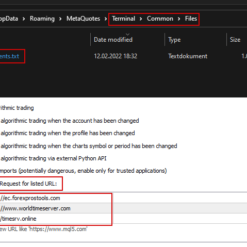
You need to give the EA access to the news list website and time server for news filter and time detection functionality to work correctly (delete spaces!):
1. http: //timesrv.online
2. http: //valeryservice.com
3. http: //valerytools.com
SentinelAI Download Package
Link download SentinelAI v1.17 MT4 With Setfiles will be sent to your email after purchase.
Installation guide (if any) will be sent immediately via email after your purchase, or you can directly download it from the website, under the section: My account -> Download.
+ Expert Advisor Download :
- SentinelAI v1.17.ex4
- Unlimited / NoDLL / Build New / Presets
- Free 1 Year Updates (If there is a new update, please check in the download on the forexeashop website or you can contact us via Email or Telegram Lucas Jason and provide proof of purchase, we will send you the update)
+ Presets :
Sentinel_ High Risk.set
Sentinel_Low Risk.set
Sentinel_Mid Risk.set
Sentinel_Significant Risk.set
Conclusion
SentinelAI is a professional MetaTrader 4 automated trading robot built for traders seeking intelligent Forex automation with AI-enhanced market analysis and adaptive filtering technology. Its combination of Deep Learning filters, price action logic, and advanced risk protection tools makes it suitable for trading major Forex pairs under varying market conditions. The EA focuses on execution quality, market efficiency, and trading flexibility while maintaining a fully automated structure for convenience and scalability. Traders looking for a modern MT4 Forex EA with advanced analytical capabilities and customizable automation features should consider integrating this system into their trading strategy.
Frequently Asked Questions (FAQs)
What currency pairs are supported?
The EA is optimized for major Forex pairs including EURUSD and GBPUSD on the M5 timeframe.
Does SentinelAI support fully automated trading?
Yes. The system is designed for 100 percent automated execution with integrated market filtering and AI-driven analysis.
What is the recommended minimum deposit?
The recommended starting balance is 1000 USD with leverage of at least 1:100 for more stable trading conditions.
Can the EA trade multiple symbols from one chart?
Yes. The one chart setup feature allows users to manage several supported symbols from a single MT4 chart.
Does the system include protection during major news events?
The EA includes advanced news filtering and stock market crash protection to help reduce trading during highly volatile market situations.
Which chart should the EA be attached to?
The developer recommends attaching the EA to only one M5 chart, with EURUSD being the preferred setup environment.
Shopping Guide and Important Information
We Accept Payment: Cryptocurrency, USDT, Binance Pay, Skrill, Paypal: Click to view
More payment methods please contact: Email or Telegram Admin.
Cryptocurrency, PayPal: Our website checkout system automated.
Memo: Your email + EA name
EA will be send to your email ASAP. The download link will be sent to your email within 5 minutes after the order is confirmed.
Some EAs will need to wait a few hours to up to 12 hours to receive the download link.
Please read and agree to the information below before purchasing our products:
Beginner traders should research and learn about trading before using any EAs.
Please make sure you understand the risks involved with trading and that past performance is no guarantee for future results. (EA could also make losses).
The product does not guarantee profits and demands resilience, patience, and a positive attitude in forex trading.
Before use, please test the EA on a demo account first.
Happy trading!