


What is Waka Waka EA MT5?
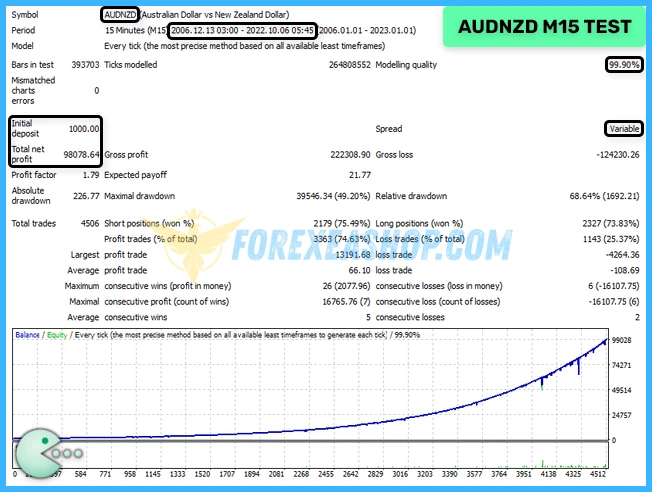
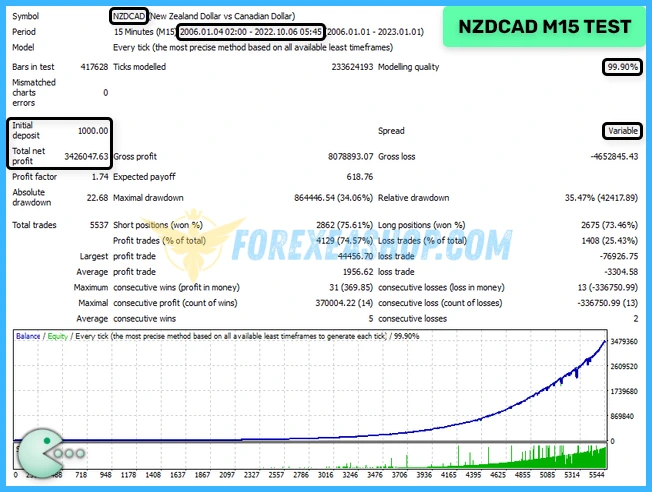
Waka Waka EA MT5 is an advanced grid trading Expert Advisor developed specifically for the MetaTrader 5 platform, designed to exploit real market inefficiencies rather than curve fitting historical data. The system operates fully automated and has been running on live accounts for years, focusing on structured grid logic combined with technical filters such as Bollinger Bands and RSI. It trades primarily on AUDCAD, AUDNZD, and NZDCAD on the M15 timeframe, using a one chart setup to manage multiple symbols simultaneously. With smart distance calculation, adaptive lot sizing, and built in risk control, the EA aims to deliver stable performance in different market conditions.
Vendor website: https://www.mql5.com/en/market/product/70283

Original price: $2800
ForexEAshop price: $34 (You Save 99%)
Who’s Behind the Creation?
This Expert Advisor is developed by Valeriia Mishchenko, who brings over 4 years of experience forex ea robot on MQL5 to the table. He has worked on several notable products, including Golden Pickaxe, News Catcher Pro, Night Hunter Pro MT5, and the highly successful Waka Waka EA MT5, which stands out as his top-performing creation.
Key Takeaways
- Waka Waka EA MT5 is an advanced grid trading Expert Advisor for MetaTrader 5 that leverages volatility based grid spacing, Bollinger Bands, RSI technical filters, and adaptive lot sizing to exploit real market inefficiencies on AUDCAD, AUDNZD, and NZDCAD within the M15 timeframe, delivering fully automated Forex trading with one chart multi symbol management and structured drawdown control.
- Designed for traders seeking stable algorithmic trading performance without complex configuration, it integrates dynamic money management, maximum drawdown protection, flexible lot sizing modes based on balance or equity, and resilience to spread and slippage, making it suitable for ECN brokers, VPS hosting environments, and accounts with a minimum deposit of 1000 USD and recommended leverage of 1:100 or higher.
- Built with long term live account validation and DLL based architecture for enhanced execution logic, the system reflects modern trends in automated trading robots, smart grid strategies, and portfolio diversification across correlated cross pairs, offering customizable presets, risk parameters, and consistent multi asset exposure for disciplined capital growth in evolving Forex market conditions.
Please read this note carefully before purchasing and using EA with DLL: If you know how to use DLL from the old terminal version and how to disable automatic updates in Metatrader, you can buy it. Or if you do not know how to install, visit Help Center, we will show you the instructions for installing EA with DLL. Don’t worry, if you see it but still cannot do it successfully, please contact Admin Lucas Jason to support you with the installation via AnyDesk.
Waka Waka EA MT5 Features
- Used on platform: Meta Trader 5.
- Currency pairs: AUDCAD, AUDNZD, NZDCAD (The EA must be attached to ONLY one M15 chart, AUDCAD is recommended.).
- Time frame: M15.
- Minimum deposit: 1000$.
- Recommend use leverage: 1:100 or higher.
- Expert Advisor trading automated 100%.
- No need to adjust GMT.
- The EA is NOT sensitive to spread and slippage.
- One Chart Setup: you only need one chart to trade all symbols.
🚀 Recommend Use VPS Forex
To keep Experts Advisor running smoothly 24/7, use a quality Forex VPS. Optimize trading efficiency, no worries about interruptions!
Register VPS NowWaka Waka EA MT5 Reviews
Waka Waka EA MT5 is an advanced grid trading Expert Advisor for MetaTrader 5 that leverages volatility based grid spacing, Bollinger Bands, RSI technical filters, and adaptive lot sizing to exploit real market inefficiencies on AUDCAD, AUDNZD, and NZDCAD within the M15 timeframe, delivering fully automated Forex trading with one chart multi symbol management and structured drawdown control.
- Symbols – symbols separated by comma (custom if empty)
- Bollinger Bands Period – period of BB used to calculate the upper/lower levels
- RSI Period – period of RSI used to filtering out trades with small potential.
- Maximum RSI Value – value for the RSI filter
- TakeProfit for Initial Trade, in pips – take profit for the initial trade (if no grid trades opened)
- TakeProfit for Grid, in pips (weighted if zero) – take-profit for the grid. If zero, then TP is weighted, i.e. it is equal to TP of the initial order in money (not in pips!)
- StopLoss for Grid, in pips (1000pips if zero) – stop-loss for the initial/grid trades
- Hide StopLoss – on/off stop-loss hiding


Waka Waka EA MT5 Results
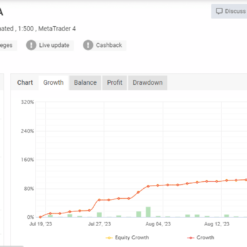
Waka Waka EA MT5 MyFxBook has amazing trading results with stable profits for 5 years (from 2018), you can check myfxbook verified track record here:
https://www.myfxbook.com/members/MischenkoValeria/waka-waka/11662830
Waka Waka EA MT5 Setting & Review
Waka Waka EA forex does not need Setfile, you only need to care about 2 points: Lot-sizing Method and Symbols (trading pairs), it is very easy to setting.
Waka Waka EA Features:
- Single Chart Trading: Simplify your trading experience with just one chart to handle all symbols.
- Multi-Currency Support: Trade multiple currency pairs effortlessly.
- Robust Backtesting and Live Performance: Benefit from reliable backtesting results and real-time trading performance.
- GMT-Free Setup: No need to adjust for GMT time zones.
- User-Friendly: Get started quickly with clear, concise instructions.
- Cost-Effective: Enjoy a cost advantage over other high-quality alternatives.
Installation Instructions:
- Attach the EA to a single M15 chart (AUDCAD is recommended).
- Update symbol names in the Symbol parameter if your broker uses a suffix (e.g., AUDCAD.a).
- Use recommended currency pairs; no need for .set files as all settings are internally stored.
- Ensure the EA has access to the news list website and a time server for accurate news filtering and time detection. Refer to the provided guide for setup instructions (from 1:00 to 2:05).
Requirements:
- The EA is not sensitive to spread and slippage but performs best with a good ECN broker.
- Continuous operation on a VPS is recommended.
- For accounts with 1:30 leverage, stick to low-risk settings if your account has less than $6000. With 1:100 leverage, you can use significant risk settings on a $1000 account.
Money Management & Risk Settings:
- Allow Opening a New Grid: Toggle on/off for opening new grids; it won’t affect already open grids.
- Lot-sizing Method: Choose a lot sizing method based on your risk preference, including Fixed Lots, Dynamic Lots (Balance/Equity based), Deposit Load (%), and predefined presets.
- Fixed Lot: Set a fixed trading lot for the initial trade.
- Dynamic Lot (Balance/Equity based): Determine the balance/equity to be used per 0.01 lot.
- Deposit Load %: Specify the percentage of the deposit used for the initial trade.
- Maximum Lot: Set the maximum allowed trading lot.
- Maximum Spread (in pips): Define the maximum allowable spread.
- Maximum Slippage for a non-ECN Account (in pips): Specify the maximum allowed slippage for non-ECN accounts.
- Maximum Symbols at a Time: Limit the maximum number of symbols that can be opened simultaneously.
- Allow Hedging: Decide whether to allow multi-directional trades on the same symbol.
- Allow Trading on Holidays: Toggle on/off the Christmas/New Year trading filter.
- Allow Buy/Sell: Enable or disable Buy/Sell trades.
- Maximum Drawdown Percent: Set a percentage threshold for the EA to close open positions when the floating drawdown exceeds it.
Strategy Settings:
- Symbols: Define symbols separated by commas (use custom if empty).
- Bollinger Bands Period: Set the period for Bollinger Bands used to calculate upper/lower levels.
- RSI Period: Specify the period for RSI used to filter out trades with small potential.
- Maximum RSI Value: Define the RSI filter value.
- Take Profit for Initial Trade (in pips): Set the take profit for the initial trade (applies if no grid trades are opened).
- Take Profit for Grid (in pips, weighted if zero): Configure the take-profit for the grid. If zero, it’s weighted based on the initial order’s TP in money (not pips).
- Stop Loss for Grid (in pips, 1000 pips if zero): Set the stop-loss for the initial/grid trades.
- Hide Stop Loss: Toggle on/off the stop-loss hiding feature.
Grid Settings:
- Trade Distance (in pips): Specify the minimum step in pips between grid (averaging) trades.
- Smart Distance: Enable auto-adjustment of trade distance based on market volatility.
- 2nd Trade Multiplier: Set the multiplier for the 2nd trade.
- 3rd-5th Trade Multiplier: Determine the multiplier for the 3rd-5th trades.
- 6th- Trade Multiplier: Configure the multiplier for the 6th and subsequent trades.
- Maximum Trades: Limit the maximum number of grid (averaging) trades.
Other Settings:
- Trade Comment: Add a comment for orders.
- UID (0…9): Adjust the unique EA instance number (usually no need to change it).
- ShowPanel: Toggle the Info-panel on/off
Why should you use Waka Waka EA MT5?
Waka Waka EA MT5 is built for traders who want a reliable grid trading system on MT5 without complex configuration or constant monitoring. Instead of relying on random averaging techniques, it integrates volatility based grid spacing, dynamic money management, and strict drawdown control to enhance long term consistency. The strategy is suitable for traders seeking automated Forex trading on cross pairs with a minimum deposit of 1000 USD and recommended leverage of 1:100 or higher.
- One Chart Multi Symbol Trading: Operates all supported currency pairs from a single M15 chart, simplifying setup and reducing operational complexity.
- Intelligent Grid System: Uses smart distance adjustment based on market volatility to optimize grid spacing and reduce excessive exposure.
- Flexible Lot Sizing Methods: Offers fixed lots, dynamic lots based on balance or equity, deposit load percentage, and predefined risk presets for tailored risk management.
- Advanced Technical Filters: Integrates Bollinger Bands and RSI indicators to filter low probability entries and improve trade quality.
- Robust Risk Control Features: Includes maximum drawdown percent protection, maximum trades limitation, stop loss configuration, and optional hedging capability.
- Not Sensitive to Spread and Slippage: Designed to perform efficiently even under variable trading conditions, especially when used with a quality ECN broker and VPS hosting.
Trading Specifications
Recommended settings and parameters to pay attention to from developers and experts:
| Features | Type |
|---|---|
| Trading platform | MetaTrader 5 (MT5) |
| Currency pairs | AUDCAD, AUDNZD, NZDCAD |
| Time frame | M15 |
| Minimum deposit | 1000$ |
| Recommend leverage | 1:100 or higher |
| Setup files | Have setfiles |
| Product type | Have DLL / Unlimited / Free 1 Year Updates |
| Recommend Broker | Exness Broker / ICMarket Broker / Tickmill / Roboforex |
| Virtual Private Server (VPS) | FXVM (Lite VPS, Basic VPS, Advanced VPS, High Freq VPS) |
How to install and run the Waka Waka EA MT5 Trading Bot have DLL in Metatrader?
- Some EA has DLL from unknown developers will be mistakenly labeled as malicious and removed by Defender or Antivirus.
- So you need turn off antivirus or windows defender protect to download and use.
- You should use VPS and you turn off antivirus or windows defender protect on VPS to use.
- Next time you reopen the VPS, you don’t need to do anything about it anymore, Without DLL, there is no need to disable it.
Please read this note carefully before purchasing and using EA with DLL: If you know how to use DLL from the old terminal version and how to disable automatic updates in Metatrader, you can buy it. Or if you do not know how to install, visit Help Center, we will show you the instructions for installing EA with DLL. Don’t worry, if you see it but still cannot do it successfully, please contact Admin Lucas Jason to support you with the installation via AnyDesk.
The EA must be attached to ONLY one M15 chart, AUDCAD is recommended.
If your broker uses a suffix (e.g. AUDCAD.a) you should update names in the Symbol parameter.
Waka Waka EA MT5 Download Package
Link download Waka Waka EA MT5 v4.56 With Setfiles will be sent to your email after purchase.
Installation guide (if any) will be sent immediately via email after your purchase, or you can directly download it from the website, under the section: My account -> Download.
+ Expert Advisor Download :
- Waka Waka EA v4.56.ex5
- Unlimited / DLL / Build 5488 MT5 / Presets
- Free 1 Year Updates (If there is a new update, please check in the download on the forexeashop website or you can contact us via Email or Telegram Lucas Jason and provide proof of purchase, we will send you the update)
+ Presets :
Waka_Waka_EA.set
Waka_Waka_Smart_TP.set
zwakawaka.set
Conclusion
Waka Waka EA MT5 provides a structured and data driven grid trading solution for traders who value automation, adaptability, and capital management. By combining real market mechanics, volatility aware grid logic, and customizable risk parameters, it delivers a balanced approach to Forex trading on MT5. The simple installation process, no GMT adjustment requirement, and one chart configuration make it accessible for both intermediate and advanced users. Deploy this automated trading robot on a reliable VPS to maintain continuous execution and enhance your portfolio stability.
Frequently Asked Questions (FAQ)
What timeframe is recommended for the best results?
The EA must be attached to only one M15 chart, with AUDCAD commonly recommended as the primary chart.
Do I need to adjust GMT settings for my broker?
No, the system does not require GMT adjustment, making installation straightforward across different broker servers.
Is the EA sensitive to spread and slippage?
It is designed to be resilient to spread and slippage variations, although using a low spread ECN broker is still advisable.
What is the minimum deposit to start using this EA?
A minimum deposit of 1000 USD is recommended to support grid expansion and proper risk allocation.
Can I customize the risk and grid parameters?
Yes, traders can adjust lot sizing methods, maximum trades, grid distance, drawdown limits, and other settings to align with their trading style and risk tolerance.
Shopping Guide and Important Information
We Accept Payment: Cryptocurrency, USDT, Binance Pay, Skrill, Paypal: Click to view
More payment methods please contact: Email or Telegram Admin.
Cryptocurrency, PayPal: Our website checkout system automated.
Memo: Your email + EA name
EA will be send to your email ASAP. The download link will be sent to your email within 5 minutes after the order is confirmed.
Some EAs will need to wait a few hours to up to 12 hours to receive the download link.
Please read and agree to the information below before purchasing our products:
Beginner traders should research and learn about trading before using any EAs.
Please make sure you understand the risks involved with trading and that past performance is no guarantee for future results. (EA could also make losses).
The product does not guarantee profits and demands resilience, patience, and a positive attitude in forex trading.
Before use, please test the EA on a demo account first.
Happy trading!