
What is AutoHedge?
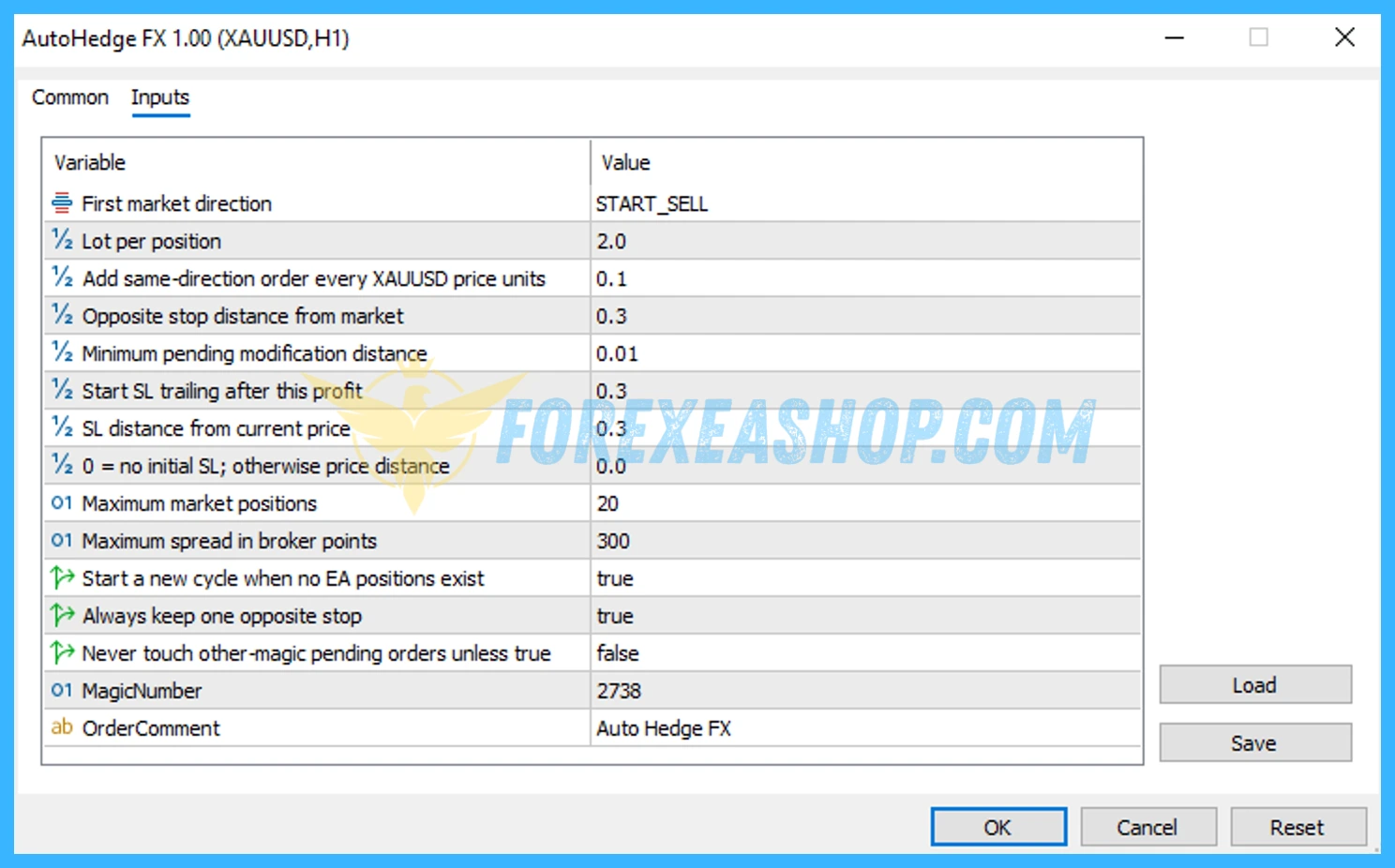
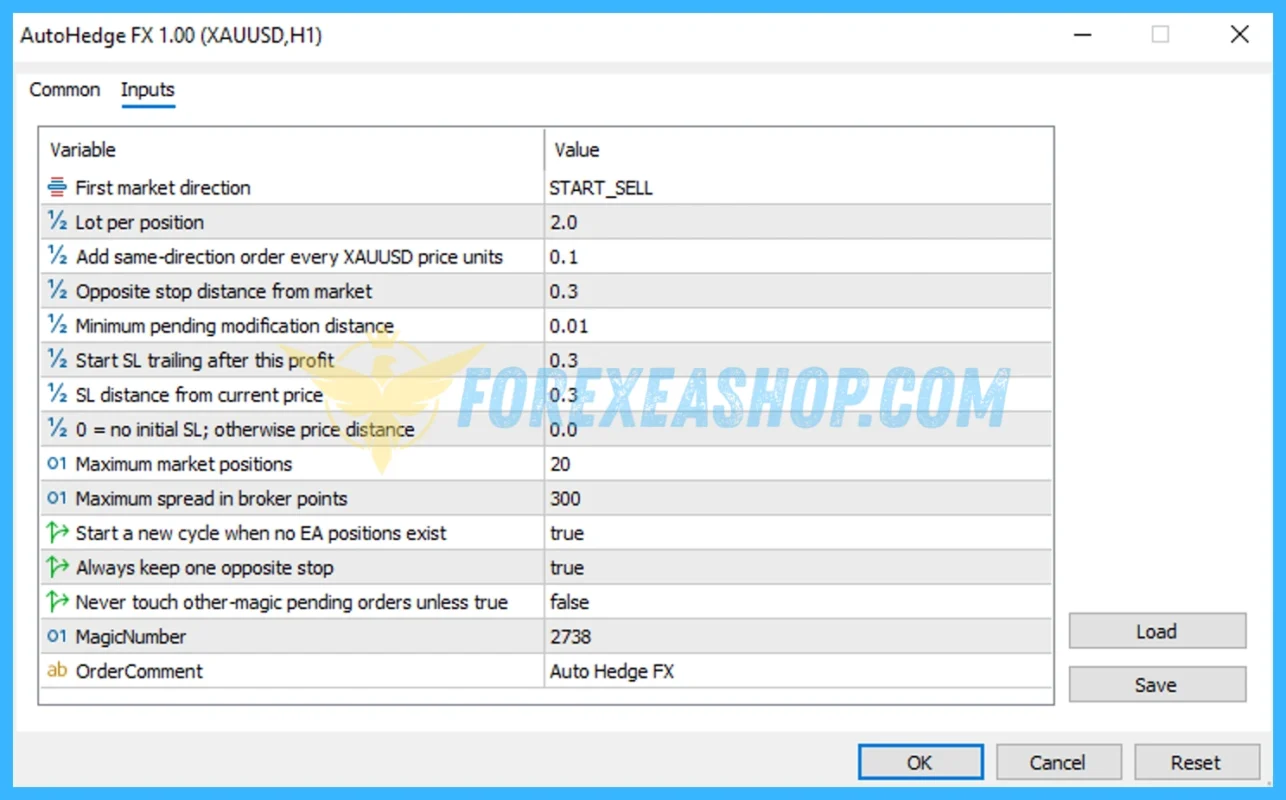
AutoHedge is a fully automated MetaTrader 5 Expert Advisor designed for XAUUSD Gold using a combined hedging and directional Grid trading structure on M5 and M30. The system opens positions at configurable price intervals while maintaining an opposite pending stop order that follows market movement, creating exposure to both trend continuation and potential reversals. Each active position receives its own trailing Stop Loss, while the EA can cap the maximum number of open positions and avoid new execution when spreads exceed its configured threshold. When all positions have closed, the algorithm automatically begins a new trading cycle without requiring manual intervention.
Vendor website: https://t.me/BestForexEA2025

Original price: $499
ForexEAshop price: $29 (You Save 99%)
Key Takeaways
- AutoHedge is an automated XAUUSD EA for MetaTrader 5 that combines directional Grid entries, opposite pending-stop hedging, per-position trailing protection, spread filtering, maximum position limits, and automatic trading-cycle restarts.
- The M5 and M30 Gold trading framework can respond to both directional continuation and reversals, while configurable Grid spacing and position limits provide practical control over how the automated strategy builds market exposure.
- Grid depth, cumulative position size, floating drawdown, free margin, Gold volatility, spread, slippage, and leverage are critical risk factors, so conservative settings and broker-specific forward testing are essential before live deployment.
AutoHedge Features
- Used on platform: Meta Trader 5.
- Currency pairs: XAUUSD (Gold).
- Time frame: M5, M30.
- Minimum deposit: 200$.
- Caps maximum open positions.
- Skips trades during high spread.
- Each position gets its own trailing SL.
- Recommend use leverage: 1:100 or higher.
- Expert Advisor trading automated 100%.
- The opposite stop follows the market.
- Starts new cycle when no positions remain.
- Opens positions in one direction every X price units (grid step).
- Always keeps one stop order on the opposite side.
🚀 Recommend Use VPS Forex
To keep Experts Advisor running smoothly 24/7, use a quality Forex VPS. Optimize trading efficiency, no worries about interruptions!
Register VPS NowAutoHedge Reviews
AutoHedge belongs to the higher-risk category of automated Gold systems because its core architecture combines multiple Grid positions with opposite-side hedging rather than limiting exposure to a single independent trade. Public search results also contain several unrelated products using the same or similar name, including a separate MT5 auto-hedging product and non-MetaTrader software, so their performance records should not be attributed to this specific XAUUSD configuration. No sufficiently reliable independently verified long-term live record for this exact M5 and M30 edition was found, making real-tick backtesting and broker-specific forward testing particularly important.

Signal EA on telegram link: Click to view
Why should you use AutoHedge?
AutoHedge can appeal to experienced Gold traders looking for an automated strategy that combines directional Grid entries, opposite-side pending orders, and individual trailing protection within a continuous trading cycle. Its architecture can participate when XAUUSD extends in the original direction while maintaining an opposite stop designed to react if price reverses. Because Grid and hedging strategies can accumulate simultaneous exposure, conservative lot sizing and sufficient free margin are essential.
- Directional Grid Execution: The EA opens positions in one direction at configurable price intervals, creating a structured sequence of entries as XAUUSD moves through the Grid.
- Opposite-Side Hedging: One pending stop order is maintained on the opposite side and follows market movement, providing a mechanism for responding when Gold changes direction.
- Individual Trailing Protection: Every active position receives its own trailing Stop Loss, allowing profitable trades to be managed separately rather than treating the entire Grid as one position.
- Maximum Position Control: A configurable cap on open positions helps restrict how far the Grid can expand, although this does not eliminate floating drawdown or margin risk.
- Spread Protection: New trading can be skipped when the current spread exceeds the permitted threshold, which is useful during unfavorable XAUUSD execution conditions.
- Automatic Cycle Restart: When no positions remain, the algorithm can begin another trading cycle automatically and continue operating without requiring the trader to rebuild the setup manually.
Trading Specifications
Recommended settings and parameters to pay attention to from developers and experts:
| Features | Type |
|---|---|
| Trading platform | MetaTrader 5 (MT5) |
| Currency pairs | XAUUSD (Gold) |
| Time frame | M5, M30 |
| Minimum deposit | 200$ |
| Recommend leverage | 1:100 or higher |
| Setup files | Have setfiles |
| Product type | Without/Have DLL / Unlimited / Free 1 Year Updates |
| Recommend Broker | Exness Broker / ICMarket Broker / Tickmill / Roboforex |
| Virtual Private Server (VPS) | FXVM Forex VPS provides reliable Windows VPS solutions optimized for MT4/MT5, helping keep Expert Advisors and automated trading platforms online 24/7 |
How to install and run the AutoHedge Trading Bot in Metatrader 5?
- Open the Metatrader 5 platform
- From the top menu, click on “File”
- Now click on “Open Data Folder”
- Open the “MQL5” folder
- Open the “Experts” folder
- Copy the AutoHedge v1.0.mq5 file here
- Then close and restart the MT5 platform
- Attach the Expert Advisor to the chart
Now, you are ready to start using the AutoHedge v1.0 MQ5 Source Code With Setfiles!
If you have any questions regarding EA installation, you can view the information in the Help Center to assist you in installing the EA: Click to view
AutoHedge Download Package
Link download AutoHedge v1.0 MQ5 Source Code With Setfiles will be sent to your email after purchase.
Installation guide (if any) will be sent immediately via email after your purchase, or you can directly download it from the website, under the section: My account -> Download.
+ Expert Advisor Download :
- AutoHedge v1.0.mq5 Source Code
- AutoHedge v1.0.ex5 Experts Advisor
- Unlimited / NoDLL / Build New / Presets
- Free 1 Year Updates (If there is a new update, please check in the download on the forexeashop website or you can contact us via Email or Telegram Lucas Jason and provide proof of purchase, we will send you the update)
+ Presets :
auto hedge xauusd 0.01 lot auto buy.set
auto hedge xauusd 0.01 lot auto sell.set
Conclusion
AutoHedge combines MT5 automation, XAUUSD Grid trading, opposite pending-stop hedging, trailing Stop Loss management, spread filtering, and automatic cycle restarts in one Gold trading system. The design offers more flexibility than a simple one-direction Grid, but hedging does not remove risk because multiple positions can still produce substantial floating drawdown and consume significant free margin during prolonged or volatile price movements. A 200 dollar minimum balance and leverage of 1:100 or higher may satisfy the supplied technical configuration, but they should not be interpreted as a conservative capital recommendation. Start with the smallest practical lot size, test M5 and M30 separately with realistic spreads and commissions, and evaluate maximum Grid depth, margin usage, and equity drawdown before using live capital.
Frequently Asked Questions (FAQs)
What platform does AutoHedge use?
AutoHedge is designed for MetaTrader 5 and operates as a fully automated Expert Advisor for Gold trading.
Which instrument does the EA trade?
The supplied configuration is designed specifically for XAUUSD Gold rather than a multi-currency Forex portfolio.
Which timeframes are recommended?
M5 and M30 are the specified operating timeframes. Traders should test each timeframe separately because trading frequency, Grid development, volatility exposure, and transaction costs can differ substantially.
How does the Grid strategy work?
The EA opens positions in one direction every configured number of price units. This creates a sequence of entries as Gold moves through predetermined Grid distances.
How does AutoHedge use hedging?
AutoHedge keeps an opposite pending stop order that follows the market while the directional Grid is active. If price moves sufficiently in the opposite direction, the pending order can create offsetting exposure rather than requiring the system to predict every reversal correctly.
Does every position have a Stop Loss?
Each position uses its own trailing Stop Loss according to the supplied strategy specifications. Traders should still verify initial protection and trailing behavior in Strategy Tester and demo trading before relying on the system with live capital.
What happens when all positions are closed?
The EA automatically starts a new trading cycle after no positions remain, allowing the strategy to continue operating without manual reinitialization.
Does the EA limit the number of open trades?
Yes. The strategy includes a maximum open-position limit that can prevent the Grid from expanding indefinitely, although positions already open can still create significant floating exposure.
Is a 200 dollar account enough?
The supplied minimum deposit is 200 dollars, but Grid and hedge strategies can require considerably more free margin during adverse price movement. A larger balance, smaller fixed lot, and conservative Grid configuration can provide more tolerance for extended XAUUSD volatility.
Is Grid and hedging trading risk free?
No. Historical experience with Grid systems shows that unfavorable market conditions can generate substantial drawdowns, and adding a hedge can change or reduce directional exposure without eliminating the underlying trading risk.
Shopping Guide and Important Information
We Accept Payment: Cryptocurrency, USDT, Binance Pay, Skrill, Paypal: Click to view
More payment methods please contact: Email or Telegram Admin.
Cryptocurrency, PayPal: Our website checkout system automated.
Memo: Your email + EA name
EA will be send to your email ASAP. The download link will be sent to your email within 5 minutes after the order is confirmed.
Some EAs will need to wait a few hours to up to 12 hours to receive the download link.
Please read and agree to the information below before purchasing our products:
Beginner traders should research and learn about trading before using any EAs.
Please make sure you understand the risks involved with trading and that past performance is no guarantee for future results. (EA could also make losses).
The product does not guarantee profits and demands resilience, patience, and a positive attitude in forex trading.
Before use, please test the EA on a demo account first.
Happy trading!

Pip Club Profit Max Pro EA MT4 Without DLL