
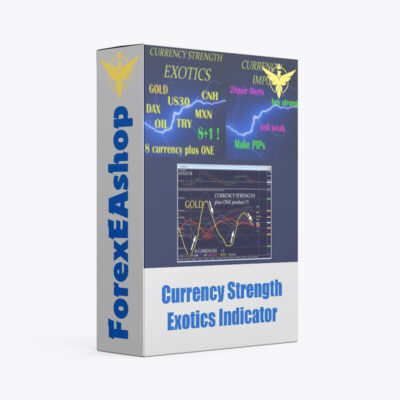
What is Currency Strength Exotics Indicator?
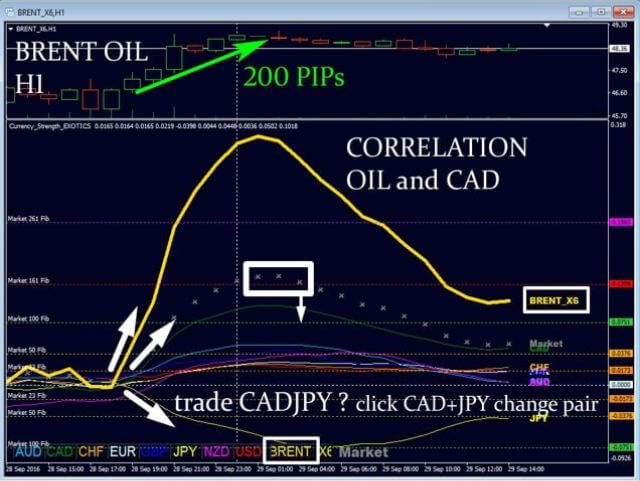
Currency Strength Exotics Indicator is a unique, high quality built on new underlying algorithms it makes it even easier to identify and confirm potential trades, It is use on platform Meta Trader 4, with only one chart can read currency strength with exotic pairs or commodity, indexes, futures. Currency Strength Exotics Indicator will improve are able to pinpoint the exact trigger point of a new trend or scalping opportunity. The indicator works for all time frame and shows the strengthin a line of the 8 main currency (AUD CAD CHF EUR GBP JPY NZD USD).
Vendor website: https://www.mql5.com/en/market/product/18696
User manual: https://www.mql5.com/en/blogs/post/708876

Original price: $160
ForexEAshop price: $19 (You Save 99%)
Key Takeaways
- Currency Strength Exotics Indicator allows traders to accurately identify and confirm potential trading opportunities in various currency pairs, commodities, indices, and futures contracts
- This indicator provides a unique and high-quality way to read the strength of currencies and other assets, enabling traders to improve their trading strategies
- Indicator works for all timeframes and can be used by both trend traders and scalpers to identify new trends and trading opportunities
Please read this note carefully before purchasing and using EA with DLL: If you know how to use DLL from the old terminal version and how to disable automatic updates in Metatrader, you can buy it. Or if you do not know how to install, visit Help Center, we will show you the instructions for installing EA with DLL. Don’t worry, if you see it but still cannot do it successfully, please contact Admin Lucas Jason to support you with the installation via AnyDesk.
Currency Strength Exotics Indicator Features
- Used on platform: Meta Trader 4
- The Indicator works for all time frames
- Confirm potential trading opportunities in various currency pairs, commodities, indices, and futures contracts
- Indicator shows the strengthin a line of the 8 main currencies (AUD CAD CHF EUR GBP JPY NZD USD) PLUS ONE more
- Shows market activity and Currency Strength Fibonacci reversal levels (Market Fibs).
Tips:
- If USD strength line and the exotic strength line show opposite direction it is a strong signal. (Double-GAP)
- Stay within the trend (GAP) of the higher time frame.
- Watch for reversal if the line is at Market Fibonacci 161 or 261.
- Check chart history at what levels the Symbol do often reverse.
- SPECIAL: To update the MT4 chart history use the 7 support charts.
🚀 Recommend Use VPS Forex
To keep Experts Advisor running smoothly 24/7, use a quality Forex VPS. Optimize trading efficiency, no worries about interruptions!
Register VPS Now
Currency Strength Exotics Indicator Settings
EXOTIC settings:
- Fix EXOTIC pair name (empty for XAUUSD and auto detect) (enter exotic pair name be fixed)
- Auto-get EXOTIC pair name from chart (do auto detect exotic pair name from chart)
- EXOTIC reverse line manually (Gold is reversed) (most products need be line reversed because priced in USD)
- Automatic reverse line (automates the function above, If USD is found as base currency like USDMXN, USDSEK, the line will not be reversed.
- Suffix for currency pairs (if EURUSD is called like EURUSDm then enter m)
- Choose quote currency for exotic pair (USD) You can now select the quote currency for gold or indices. While it is usually displayed in USD, in exceptional cases it may be e.g. EUR.
Chart settings:
- Use currency specific characteristics
- Line width base and quote CS (make thicker the currency of the chart)
- Show USD line always thick (used with indexes…)
- Line width other 6 CS (the other currencies which are not part of the chart)
- Line other 6 CS dotted if width=1
- EXOTIC Line width same other 6 CS (false: exotic line always thicker)
- HIDE the other 6 CS lines (show only base and quote currency line)
- HIDE EXOTIC line if symbol is not on chart (true: no exotic line if a currency selected)
- Line width Market (size of Market Momentum dot) (Market Activity)
- Draw Market line as a cross
- Draw GAP (arrows in sub-window to show strong currency momentum GAP)
- GAP Market Fib (23) (angle/slope of currency to draw arrow)
- Show Bars back (how many candles back the indicator prints the currency lines)
- Quick chart open in new window (false: change pair in same chart)
- Show CS labels end of line

Other Settings:
- open support charts! (SPECIAL: Automated MT4 history updates with background charts! This charts are for updating external currency quotes. Remove all indicators from this chart. Keep it minimized.)
- arrow size (1 to 5)
- Font size button(The size of currency names or buttons)
- CS label size
- Font spacing X (big screen) (This is for those who have big 4K monitor. It might be needed to add to horizontal spacing of the buttons.)
- Font spacing Y (same as above but vertical spacing)
- show line always bold (Comma separated CS list) Use it for thicker currency lines of your choice e.g. EUR,GBP
- use EXO-PIN For developers and to use with Combo Signals EXO indicator tool.


How to install and run the Currency Strength Exotics Indicator Trading Bot have DLL in Metatrader?
- Some EA has DLL from unknown developers will be mistakenly labeled as malicious and removed by Defender or Antivirus.
- So you need turn off antivirus or windows defender protect to download and use.
- You should use VPS and you turn off antivirus or windows defender protect on VPS to use.
- Next time you reopen the VPS, you don’t need to do anything about it anymore, Without DLL, there is no need to disable it.
Please read this note carefully before purchasing and using EA with DLL: If you know how to use DLL from the old terminal version and how to disable automatic updates in Metatrader, you can buy it. Or if you do not know how to install, visit Help Center, we will show you the instructions for installing EA with DLL. Don’t worry, if you see it but still cannot do it successfully, please contact Admin Lucas Jason to support you with the installation via AnyDesk.
Currency Strength Exotics Indicator Download
Link download Currency Strength Exotics Indicator v3.0 MT4 will be sent to your email after purchase.
Installation guide (if any) will be sent immediately via email after your purchase, or you can directly download it from the website, under the section: My account -> Download.
+ Expert Advisor Download :
- Currency Strength Exotics Indicator v3.0
- Unlimited / DLL / Indicator
- Free 1 Year Updates (If there is a new update, please check in the download on the forexeashop website or you can contact us via Email or Telegram Lucas Jason and provide proof of purchase, we will send you the update)
Shopping Guide and Important Information
We Accept Payment: Cryptocurrency, USDT, Binance Pay, Skrill, Paypal: Click to view
More payment methods please contact: Email or Telegram Admin.
Cryptocurrency, PayPal: Our website checkout system automated.
Memo: Your email + EA name
EA will be send to your email ASAP. The download link will be sent to your email within 5 minutes after the order is confirmed.
Some EAs will need to wait a few hours to up to 12 hours to receive the download link.
Please read and agree to the information below before purchasing our products:
Beginner traders should research and learn about trading before using any EAs.
Please make sure you understand the risks involved with trading and that past performance is no guarantee for future results. (EA could also make losses).
The product does not guarantee profits and demands resilience, patience, and a positive attitude in forex trading.
Before use, please test the EA on a demo account first.
Happy trading!


Reviews
There are no reviews yet.