What is Mustang EURUSD H1?
Mustang EURUSD H1 Expert Advisor is the ultimate automated hedging solution for traders, work on meta trader 4 platform. Designed with an efficient breakout strategy, advanced money management techniques, and robust probabilistic analysis, it’s perfectly suited for both beginners and seasoned professionals. The EA executes entries and exits exclusively at bar close, effectively filtering out market noise, enhancing execution speed, and minimizing the risk of stop loss hunting.
Vendor website: https://www.mql5.com/en/market/product/96229
Original price: $499
ForexEAshop price: $19 (You Save 95%)
Why should you use Mustang EURUSD H1?
You should use Mustang EURUSD H1 because it is a powerful automated hedging solution that combines an efficient breakout strategy, advanced money management, and probabilistic analysis. It is suitable for both beginners and experienced traders, operates with precision by executing trades at bar close to reduce market noise, and avoids high-risk strategies like martingale or grid. Additionally, it includes essential features like drawdown protection, spread filtering, and flexible money management options, making it a reliable and user-friendly choice for trading the EURUSD pair on the H1 timeframe.
Key Takeaways:
- Uses a breakout strategy with bar-close logic to reduce noise and avoid stop loss hunting.
- Optimized for EURUSD H1, with advanced entry filters and no high-risk strategies like martingale.
- Features flexible money management, drawdown protection, and is easy to set up on hedging accounts.
About The Author
This Expert Advisor is developed by Raphael Schwietering, who brings over 7+ years of experience in MQL5 to the table. He has worked on several notable products, including High Fly, Goldust XAUUSD, Forex Daemon, and the highly successful Mustang EURUSD H1, which stands out as his top-performing creation.
Mustang EURUSD H1 Features
- Used on platform: Meta Trader 4.
- Curency pairs: EURUSD.
- Time frame: H1.
- Minimum deposit: 500$.
- Recommend Leverage: 1:500.
- Advanced algorit hm for entering and exiting the market.
- Spread Filter, Equity Stop, Drawdown Protection.
- Works with 4-5 digits Brokers.
- Hard stop loss and take profit for each position.
- Backtest fastest method with Model: Open Prices only (Entry and exit logic operates on bar close).
- No grid, no martingale, no arbitrage, no tick scalping, non curve fitting.
- Expert Advisor trading automated 100%.
🚀 Recommend Use VPS Forex
To keep Experts Advisor running smoothly 24/7, use a quality Forex VPS. Optimize trading efficiency, no worries about interruptions!
Register VPS NowMustang EURUSD H1 Reviews
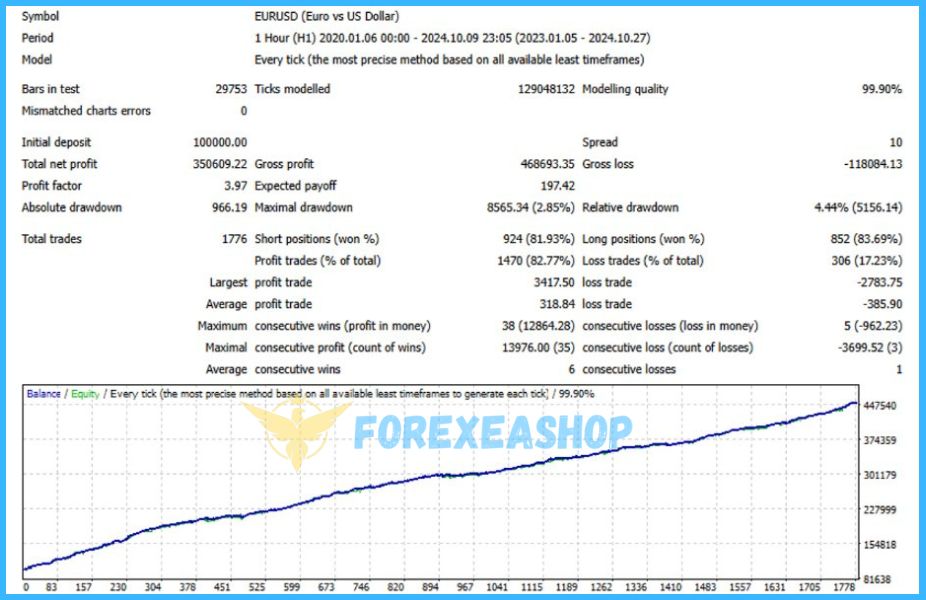
Experts Advisor uses an advanced algorithm to find entry points, along with several filters for entering and exiting the market, making it most effective in price consolidation stages. It works best on the EURUSD pair with an H1 timeframe and is non-curve-fitting, avoiding strategies like grid, martingale, arbitrage, and tick scalping.

Trading Specifications
Recommended settings and parameters to pay attention to from developers and experts:
| Features | Type |
|---|---|
| Trading Platform | MetaTrader 4 (MT4) |
| Currency pairs | EURUSD |
| Time Frame | H1 |
| Minimum deposit | 500$ |
| Recommend Leverage | 1:500 |
| Setup files | Default setting |
| Trading | Expert Advisot trading automated 100% |
| Broker | Exness Broker / ICMarket Broker / Tickmill / Roboforex |
| Product type | Without DLL / Unlimited / Unlocked |
| Virtual private server (VPS) | FXVM (Lite VPS, Basic VPS, Advanced VPS, High Freq VPS) |
How to install and run the Mustang EURUSD H1 Trading Bot in Metatrader 4?
- Open the Metatrader 4 platform
- From the top menu, click on “File”
- Now click on “Open Data Folder”
- Open the “MQL4” folder
- Open the “Experts” folder
- Copy the Mustang EURUSD H1 v3.3.ex4 file here
- Then close and restart the MT4 platform
- Attach the Expert Advisor to the chart
Now, you are ready to start using the Mustang EURUSD H1 v3.3 MT4 Without DLL!
If you have any questions regarding EA installation, you can view the information in the Help Center to assist you in installing the EA: Click to view
Mustang EURUSD H1 Downloads
Link download Mustang EURUSD H1 v3.3 MT4 Without DLL will be sent to your email after purchase.
Installation guide (if any) will be sent immediately via email after your purchase, or you can directly download it from the website, under the section: My account -> Download.
+ Expert :
- Mustang EURUSD H1 v3.3.ex4
- Unlimited / NoDLL / Build New
- Free 1 Year Updates (If there is a new update, please check in the download on the forexeashop website or you can contact us via Email or Telegram Lucas Jason and provide proof of purchase, we will send you the update)
Shopping Guide and Important Information
We Accept Payment: Cryptocurrency, USDT, Binance Pay, Skrill, Paypal: Click to view
More payment methods please contact: Email or Telegram Admin.
Cryptocurrency, PayPal: Our website checkout system automated.
Memo: Your email + EA name
EA will be send to your email ASAP. The download link will be sent to your email within 5 minutes after the order is confirmed.
Some EAs will need to wait a few hours to up to 12 hours to receive the download link.
Please read and agree to the information below before purchasing our products:
Beginner traders should research and learn about trading before using any EAs.
Please make sure you understand the risks involved with trading and that past performance is no guarantee for future results. (EA could also make losses).
The product does not guarantee profits and demands resilience, patience, and a positive attitude in forex trading.
Before use, please test the EA on a demo account first.
Happy trading!