

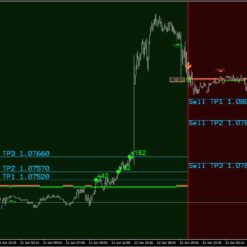
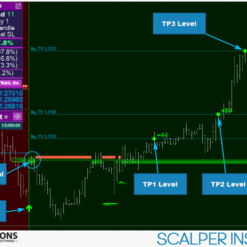
What is Scalper Inside PRO?
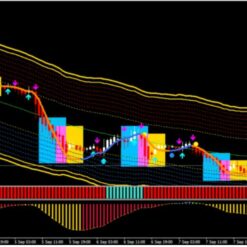
Scalper Inside PRO is exclusive indicator that utilizes an innovative algorithm to swiftly and accurately determine the market trend, work on Meta Trader 4 platform. The indicator automatically calculates opening, closing, and profit levels, providing detailed trading statistics. Additionally, you can easily integrate your own arrow indicators into Scalper Inside Pro to quickly evaluate their statistics and profitability. It use Next-Generation Trend Detection Algorithm (NG TDA).
Vendor website: https://www.mql5.com/en/market/product/53124

Original price: $129
ForexEAshop price: $14 (You Save 90%)
Key Takeaways
- Scalper Inside PRO is an exclusive indicator with a Next-Generation Trend Detection Algorithm (NG TDA) that swiftly and accurately determines market trends on Meta Trader 4 platform.
- It automatically calculates opening, closing, and profit levels, provides detailed trading statistics, and allows integration of custom arrow indicators for quick evaluation of their profitability.
- The indicator offers three trading strategies, is suitable for all trading instruments and timeframes, and is customizable for both experienced traders and beginners, recommending the use of a VPS for optimal performance.
Scalper Inside PRO Features
- Used on platform: Meta Trader 4
- Currency pairs: Any pairs forex.
- Time frame: Any time, but M5 recommend.
- Next-Generation Trend Detection Algorithm (NG TDA).
- Automatic Detection of Opening, Closing and Target Levels.
- Multi-level Profit-taking System.
- High Time Frame (HTF) Impulse Filter.
- Detailed Statistics Calculation.
- Three Awesome Trading Strategies Included.
- Suitable for Any Trading Instruments and Timeframes.
- Connect Custom Indicators to Calculate Statistics and Check Profitable.
- Easy-to-Use Rules.
- Suitable for both Experienced and Beginners.
- Fully Customizable Non Repaint Indicator.
🚀 Recommend Use VPS Forex
To keep Experts Advisor running smoothly 24/7, use a quality Forex VPS. Optimize trading efficiency, no worries about interruptions!
Register VPS Now
Scalper Inside PRO Reviews
It automatically calculates opening, closing, and profit levels, provides detailed trading statistics, and allows integration of custom arrow indicators for quick evaluation of their profitability.


Scalper Inside PRO Settings
Settings Description:
[Select Strategy – strategy choice for trading]: Strategy-1 / Strategy-2 / Strategy-3 / Custom Indicator – connecting a Custom Indicator [Strategy 1-3 Sensitivity]: adjusting the Sensitivity for Strategy 1-2 (values from -5 to +18) [Open Position Mode]: Next Candle Entry / Delta Entry [Select Close Position Settings]: Auto Calculate SL / Reversal SL / Use Manual SL [Use Manual TP1, TP2, TP3]: use Manual TP1, TP2, TP3 (true/false)Alerts Settings:
[All Alerts Disabled]: all alerts quickly disabled, if = true [Arrows Email Alert] / [Arrows Sound Alert] / [Arrows Pop-up Alert] / [Arrows Send Notifications] – activate/deactivate different types of signals, when the Arrow Signal appearsVisual Settings:
[Use Auto Color Theme]: use a preset Color Scheme [Select Color Theme]: Dark/Light theme selection, if [Auto Color Theme] = true [Panel Size Scale (0.5 – 2.0)]: changes the scale of the indicator control panelAll of the following graphical settings will allow you to turn signals On/Off and completely change the color scheme. To use custom color settings, please do not forget to disable automatic theme selection: [Use Auto Color Theme] = false
Please to read manual: Click to view
Trading Specifications
Recommended settings and parameters to pay attention to from developers and experts:
| Features | Type |
|---|---|
| Trading Platform | MetaTrader 4 (MT4) |
| Currency pairs | Any pairs forex |
| Time Frame | Any time frame |
| Minimum deposit | 200$ |
| Recommend Leverage | 1:500 |
| Trading | Expert Advisot trading automated 100% |
| Trader | Suitable for Beginners and professional traders |
| Broker | Broker Compatibility Any broker |
| Product type | Without DLL |
| Virtual private server (VPS) | Recommned Use VPS |
How to install and run the Scalper Inside PRO MT4 Trading Bot in Metatrader 4?
- Open the Metatrader 4 platform
- From the top menu, click on “File”
- Now click on “Open Data Folder”
- Open the “MQL4” folder
- Open the “Indicator” folder
- Copy the Scalper Inside PRO MT4 file here
- Then close and restart the MT4 platform
- Attach the Expert Advisor to the chart
Now, you are ready to start using the Scalper Inside PRO MT4 v7.9 Indicator Without DLL!
If you have any questions regarding EA installation, you can view the information in the Help Center to assist you in installing the EA: Click to view
Scalper Inside PRO Downloads
Link download Scalper Inside PRO MT4 v7.9 Indicator Without DLL will be sent to your email after purchase.
Installation guide (if any) will be sent immediately via email after your purchase, or you can directly download it from the website, under the section: My account -> Download.
Updated March 31, 2025: Scalper Inside PRO MT4 v7.9 Indicator Without DLL (Build 1440+ MT4) ( Without DLL)
Updated December 28, 2024: Scalper Inside PRO MT4 v7.0 Indicator Without DLL (Build 1431+) ( Without DLL)
Updated December 08, 2024: Scalper Inside PRO MT4 V6.7 Indicator Without DLL (Build 1430+) ( Without DLL)
+ Expert Advisor Download :
- Scalper Inside PRO v4.4.ex4 Indicators
- Unlimited / NoDLL / Build New
- Free 1 Year Updates (If there is a new update, please check in the download on the forexeashop website or you can contact us via Email or Telegram Lucas Jason and provide proof of purchase, we will send you the update)
Shopping Guide and Important Information
We Accept Payment: Cryptocurrency, USDT, Binance Pay, Skrill, Paypal: Click to view
More payment methods please contact: Email or Telegram Admin.
Cryptocurrency, PayPal: Our website checkout system automated.
Memo: Your email + EA name
EA will be send to your email ASAP. The download link will be sent to your email within 5 minutes after the order is confirmed.
Some EAs will need to wait a few hours to up to 12 hours to receive the download link.
Please read and agree to the information below before purchasing our products:
Beginner traders should research and learn about trading before using any EAs.
Please make sure you understand the risks involved with trading and that past performance is no guarantee for future results. (EA could also make losses).
The product does not guarantee profits and demands resilience, patience, and a positive attitude in forex trading.
Before use, please test the EA on a demo account first.
Happy trading!


Reviews
There are no reviews yet.