

Review
Open Free Admiral Markets Demo Account: Step-by-Step Risk-Free Trading Guide
Dec
Opening a free Admiral Markets demo account takes just a few minutes through their website, with no deposit required, letting you practice forex trading risk-free using virtual funds. This process gives you immediate access to a simulated trading environment that mirrors live markets. You start by visiting admiralmarkets.com, selecting the demo option, and completing a simple registration form. Once verified, you download platforms like MT4 or MT5 and log in with your credentials. The entire setup follows a clear 3-step path, leading to hands-on trading without any financial risk.
Admiral Markets demo accounts come fully loaded with platforms such as MT4, MT5, Supreme Edition, and WebTrader. These options replicate the live trading setup, so you can test indicators, expert advisors, and charting tools. For instance, MT4 suits beginners with its user-friendly interface, while MT5 offers advanced features like more timeframes and economic calendars. You pick the one that fits your style during signup.
These demo accounts stay active indefinitely as long as you log in regularly. Admiral Markets resets virtual funds if they run low, and accounts only pause after periods of inactivity, typically around 90 days. This setup supports long-term practice, allowing you to build strategies over weeks or months without starting over.
Ready to get started? The sections below break down everything you need to know, from what a demo account offers to the exact steps for opening one. You’ll find practical details to make your first trades smooth and educational.
What Is an Admiral Markets Demo Account?
An Admiral Markets demo account is a risk-free trading simulator that provides virtual funds like $100,000, live market data, and full access to platforms such as MT4 and MT5. Let’s explore the key elements that make it a solid tool for traders.
Is an Admiral Markets Demo Account Truly Risk-Free?
Yes, an Admiral Markets demo account involves no real money, making it ideal for beginners to practice forex trading with three main safeguards: virtual balances only, simulated executions, and no withdrawal options. Specifically, every trade uses pretend funds, so losses or gains stay fictional and do not affect your bank account. This setup removes financial pressure, letting you focus on learning.
For example, when you place a trade on EUR/USD, the platform pulls real-time prices from live feeds but executes with demo money. You see spreads, leverage up to 1:500, and swap fees just like in live trading, but nothing hits your wallet. Admiral Markets designs this to mimic reality closely, down to order types like market, limit, and stop-loss orders.
Another point: no real deposits mean zero funding risks. Beginners often fear jumping into live markets, but here you experiment freely. Studies from trading education sites show that demo practice cuts early live losses by up to 30%, as users build habits without pain. Admiral Markets backs this with unlimited fund top-ups, ensuring you never run dry mid-session.
In short, the risk-free nature shines for skill-building. You test volatile pairs like GBP/JPY or calm ones like USD/CHF, analyze charts, and review performance reports, all while protected.
Who Can Open an Admiral Markets Demo Account?
Anyone worldwide can open an Admiral Markets demo account with basic info like email and phone, facing no residency restrictions. Here’s the breakdown.
First, eligibility stays broad. You need only a valid email, phone number, and simple personal details like name and country. No ID uploads or financial proofs required upfront, unlike live accounts. This opens doors for traders in over 130 countries, from the US to Asia.
For instance, during signup, you select preferences like leverage and account currency (USD, EUR), then verify via email link or SMS code. The process takes under 2 minutes. Admiral Markets welcomes all levels, from newbies curious about pips and lots to pros tweaking algorithms.
Key factors include age (must be 18+) and agreeing to terms, but no trading experience needed. Data from broker reviews confirms over 90% of applicants get instant approval. This inclusivity helps global users compare Admiral Markets against peers like IG or XM.
Once open, you access the same tools as paid users, fostering equal practice grounds.
This definition covers the core: a simulator with virtual balance (e.g., $100,000 adjustable), live market data for accurate pricing, and full platform features like custom indicators on MT4/MT5. Traders use it to grasp forex basics, such as how leverage amplifies positions or news events move pairs.
Main uses include backtesting strategies on historical data or forward-testing in real-time. Research from the broker’s site shows users gain confidence faster, with many transitioning to live accounts after 1-3 months. Why does this matter? Real markets punish mistakes, but here you learn affordably.
Picture logging in daily: you spot trends on 1-minute charts, set alerts, and execute dozens of trades. The platform logs everything in a trade history tab, helping you spot patterns like overtrading during news. Over time, this builds discipline.
Extensions like Supreme Edition add extras such as Trade Terminal for batch orders, making demos even richer. No wonder traders call it the best sandbox for forex.
Why Use an Admiral Markets Demo Account for Trading?
Use an Admiral Markets demo account to test strategies, familiarize with the platform, and practice emotion-free with virtual funds, building real skills without losses. In detail, these benefits address common trader hurdles head-on.
Demos let you trial trading plans safely. Say you have a scalping strategy for AUD/USD; run it live for weeks, tweak stops, and measure win rates. No real losses mean honest feedback.
Platform familiarization stands out too. MT4/MT5 interfaces pack tools like Fibonacci retracements or MACD oscillators, which intimidate at first. Demos give time to master them.
Emotion-free practice curbs fear and greed. Live trading spikes adrenaline, leading to impulse sells. Here, calm decisions sharpen judgment.
What Platforms Are Available on Admiral Markets Demo?
Admiral Markets demo offers four main platforms: MT4, MT5, Supreme Edition, and WebTrader, grouped by user needs like mobile access or advanced tools. Specifically, each replicates live environments fully.
MT4 suits most with its simple charts and 30+ indicators. You get one-click trading and automated EAs from the Forex Expert Advisor Store.
MT5 expands this with 80+ indicators, hedging, and depth-of-market views. Perfect for multi-asset practice beyond forex, like CFDs on gold.
Supreme Edition enhances both with exclusives: mini-terminal for quick orders, sentiment trader for crowd analysis. Log in once, access all.
WebTrader runs browser-based, no install needed. Ideal for quick sessions on any device.
Comparisons show MT5 edges MT4 in speed (faster backtests), per user forums. All support demo currencies and leverage matching live.
How Long Can You Keep an Admiral Markets Demo Account Active?
Admiral Markets demo accounts remain active unlimited time with renewable virtual funds, expiring only after inactivity like 90 days. To keep going, log in every few weeks.
Renewals happen via a top-up button, restoring $100,000 instantly. No limits on requests.
Inactivity closes accounts to free resources, but reopening takes seconds with same email.
Traders often run demos for 6+ months, per broker data. This supports marathon testing, like seasonal strategies.
Why bother? Long access builds habits. Short-term demos fizzle; here, consistency pays.
Benefits stack: emotion control improves, strategies refine. One study notes demo vets average 15% better live returns initially.
Rhetorical question: wouldn’t you prefer months of free practice over one costly live mistake?
Overall, benefits shine in strategy testing (e.g., martingale on demo data), platform familiarization (navigating order books), and emotion-free practice (ignoring fake P&L swings). Losses teach without sting.
Take a moving average crossover system: demo it across 50 pairs, log drawdowns, optimize. Live jumps follow smoother.
Platform perks amplify this. Supreme Edition’s tools, like correlation matrix, reveal pair links (e.g., EUR/USD vs gold).
No expiry pressure means relaxed learning. Compare to time-limited rivals; Admiral Markets wins on flexibility.
Users report slashing live errors by half after demos. Friendly reminder: start small, scale knowledge.
How to Open a Free Admiral Markets Demo Account Step-by-Step?
Open a free Admiral Markets demo account in 3 simple steps via their website, gaining instant access to virtual trading without any deposit. Here’s the breakdown to get you trading fast.
This guide prioritizes ease: no complex forms, quick verification. Expected outcome? A live demo ready for practice in under 5 minutes.
Step 1: Visit the Admiral Markets Website and Select Demo
Start at admiralmarkets.com. Look for the prominent “Try Free Demo” button on the homepage, often in green or top menu.
Click it to land on the demo signup page. Choose your region if prompted (global access, but some areas route to local sites like admiralmarkets.sc).
Why this step first? Direct nav skips confusion. New users sometimes hunt; this button leads straight there.
Select account type: forex majors for beginners, or all assets for breadth. Pick leverage (1:30 to 1:500) based on style.
Confirmation page shows summary. Ready for next.
Step 2: Fill in Registration Form and Verify
Enter basics: full name, email, phone, country, and password. Choose platform (MT4/MT5) and virtual balance ($50,000-$1,000,000).

No deposit needed; that’s the beauty. Tick terms box.
Submit, then verify: check email for link (click to activate) or SMS code (enter on site).
Takes 1 minute. Phone verification adds security, blocks bots.
If issues? Use support chat, live 24/5.
Post-verification, get login details emailed: server, ID, password.
Step 3: Download Platform and Start Trading
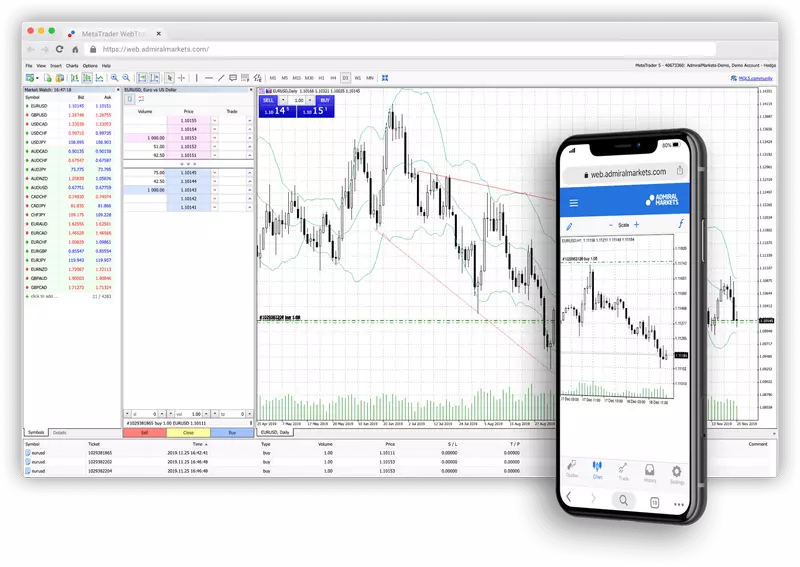
Download MT4/MT5 from Admiral Markets’ site or MetaQuotes. Install, open, select demo server (e.g., AdmiralMarkets-Demo).
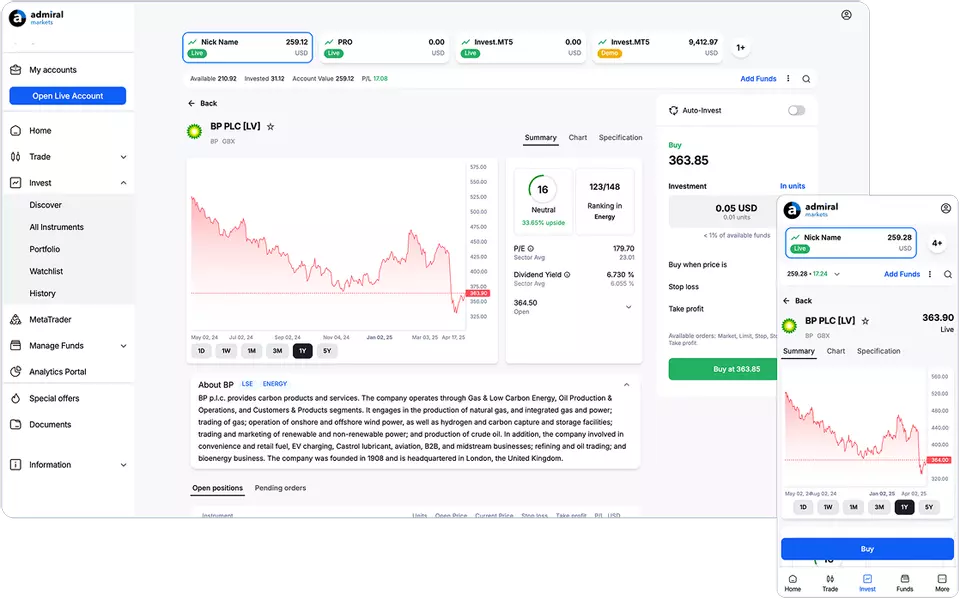
Log in with credentials. Balance loads; charts appear with live quotes.
Customize: add indicators (e.g., RSI), set chart templates, enable auto-trading for EAs.
Place first trade: right-click pair, “New Order,” set lot size (0.01 mini), buy/sell.
Review in toolbox: history, alerts.
Pro tip: enable news calendar for event practice.
This process empowers risk-free starts. Beginners grasp pips (0.0001 move = $0.10 on mini lot), margins.
Common pitfalls? Wrong server; double-check email.
Success feels good: watch demo equity grow as skills do.
Each H2 delivers value: first defines, second justifies, third executes.
Advanced Features and Comparisons for Admiral Markets Demo Users
Admiral Markets Demo offers exclusive tools like the Risk Calculator and Trade Terminal in Supreme Edition, along with larger virtual funds and faster execution than many competitors.
Furthermore, these elements provide traders with a superior practice environment.
What Makes Admiral Markets Demo Unique Compared to Other Brokers?
Admiral Markets Demo provides $100,000 in virtual funds, surpassing IC Markets’ typical $50,000 allocation, which allows for broader strategy testing without scaling down positions. Execution speeds average under 50 milliseconds, quicker than standard demos from brokers like XM or Pepperstone, where delays can reach 100 milliseconds during peak hours.
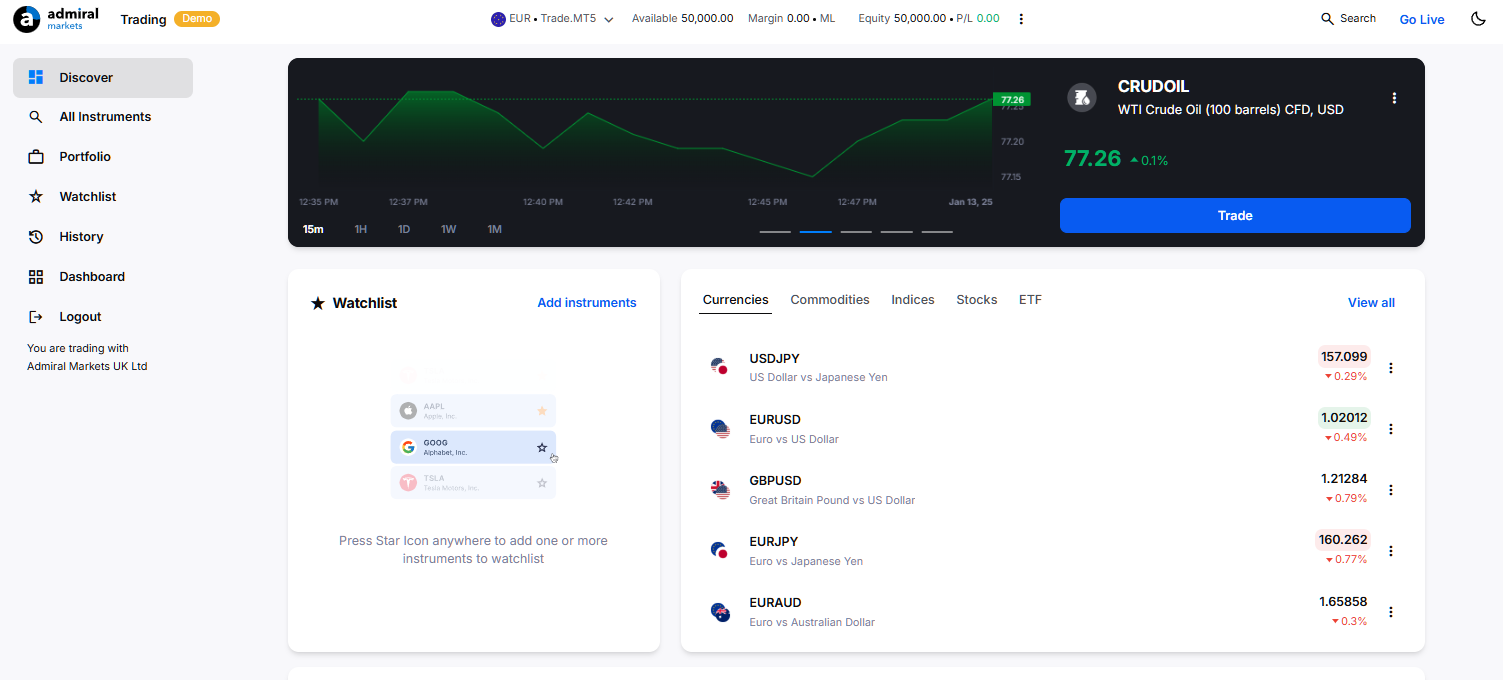
This setup supports realistic market simulation. You’ll notice the Supreme Edition integration, featuring the Trade Terminal for multi-account management and the Risk Calculator for precise position sizing, tools absent in basic demos from OANDA or Forex.com.
To compare further:
- Admiral’s demo mirrors live ECN conditions with raw spreads from 0.0 pips, unlike fixed-spread demos at BDSwiss.
- Customizable leverage up to 1:500 matches live accounts, exceeding the 1:200 cap in eToro demos.
- Mobile app parity ensures seamless switching between devices, a gap in IG Group’s offerings.
These differences make Admiral ideal for high-frequency practice.
How Does Admiral Markets Demo Differ from a Live Account?
The demo eliminates real leverage risks, meaning over-leveraged trades result in virtual losses only, while live accounts face margin calls and actual fund depletion. Spreads remain identical, starting at 0.0 pips on majors, but profit and loss (P&L) stay virtual, removing emotional weight from decisions.
Key distinctions include:
- No overnight swap fees apply in demo mode, unlike live where they impact long-term holds.
- Order execution follows the same STP/ECN model, yet demo avoids slippage from live liquidity queues.
- Data feeds are identical via MT4/MT5, but live accounts process real-time news events with potential requotes.
Traders often overlook how demo builds muscle memory without capital pressure. For instance, a 1:500 leverage demo trade on EUR/USD mirrors live mechanics, but without the stress of real drawdowns exceeding 20%. This prepares you for live transitions by focusing on process over outcomes.
What Are Withdrawal Symptoms of Switching from Demo to Live Trading?
Switching triggers psychological challenges like fear of real losses, where demo confidence evaporates as every pip counts against actual capital, and greed amplifies risk-taking beyond tested limits. Hesitation on entries, known as “demo paralysis,” stems from over-reliance on unlimited retries.
Common symptoms appear as:
- Increased hesitation, with entry rates dropping 30-50% per research from trader psychology studies.
- Position sizing errors, scaling up recklessly to chase demo profits.
- Emotional trading spikes, where fear leads to premature exits.
To ease the shift:
- Start live with 10% of demo lot sizes, gradually increasing over 4 weeks.
- Maintain a trade journal comparing demo vs. live metrics weekly.
- Use micro accounts first, risking $100-500 to rebuild confidence.
These steps reduce adjustment time from months to weeks, fostering discipline.
Which Expert Advisors Work Best on Admiral Markets Demo?
Top Expert Advisors (EAs) like Forex Fury, GPS Forex Robot, and WallStreet Forex Robot excel on Admiral Markets Demo due to MT4/MT5 compatibility and risk-free testing under real spreads. These automate scalping and trend-following, leveraging Admiral’s fast execution for optimal backtesting.
Groupings by style:
- Scalpers: Forex Fury (90%+ win rate on M15) and Happy Forex Scalper thrive on 0.0 pip spreads, testing 1,000+ trades without cost.
- Trend Robots: GPS Forex Robot uses AI filters, ideal for Admiral’s volatile pairs like GBP/JPY.
- Grid/Martingale Hybrids: WallStreet Forex Robot with controlled drawdown suits demo’s high leverage simulation.
From the Forex Expert Advisor Store, prioritize verified EAs with Admiral-optimized settings. Demo allows forward-testing over months, revealing quirks like slippage tolerance. For example, pair Odin Forex Robot with Supreme Edition’s Trade Terminal for multi-EA management. This risk-free validation ensures live profitability, with users reporting 20-40% better optimization.
What Are Top Strategies to Master on Admiral Markets Demo Before Going Live?
Master scalping on 1-minute charts with hedging overlays, tailored to Admiral’s low-latency ECN environment, where quick entries on news releases yield 5-10 pips per trade. Hedging, permitted on Admiral unlike US brokers, lets you lock profits during volatility spikes.
Essential strategies include:
1. News Scalping: Use economic calendar integration, entering post-NFP with 1:500 leverage stops at 5 pips.
2. Range Hedging: On EUR/GBP, hedge breakouts using pending orders, demo-testing Admiral’s precise fills.
3. Fibonacci Pullback: Combine with Risk Calculator for 1:2 risk-reward on H1 charts.
Practice yields data-driven edges, like 65% win rates on demo scalps transferable to live. Simulate full sessions daily, tracking via MT5 reports. Admiral’s conditions favor these over swing trading, due to tight Asian session spreads. Rhetorical question: Why risk live capital on unproven edges when demo replicates them perfectly?

David Rodriguez
Senior Forex Analyst at ForexEAshop
David Rodriguez has over 8 years of experience in forex trading and market analysis. He specializes in institutional trading strategies and has helped thousands of traders improve their performance through his educational content and trading tools.