

Review
Unlock AMBroker: Powerful Forex Trading Tools for Serious Investors
Dec
AMBroker is a robust technical analysis platform that you can unlock through the Forex Expert Advisor Store to access powerful Forex trading tools designed for serious investors. This setup gives you real-time data processing, advanced charting, and automation features tailored for currency markets. Traders turn to it because it handles high-frequency Forex data with precision, helping you spot opportunities in pairs like EUR/USD or GBP/JPY. By activating the full version, you move beyond basic demos to professional-grade tools that support data-driven decisions.
Unlocking AMBroker takes a simple license activation process from the Forex Expert Advisor Store. You purchase a key, enter it in the software, and gain instant access to premium features. This upgrade transforms the platform into a complete trading workstation.
AMBroker stands out for serious investors with its custom scripting in AFL language and automated trading support. These elements let you build strategies that run autonomously, backtest ideas on historical Forex data, and manage portfolios across multiple pairs.
Ready to see how this fits your trading? The sections below break down everything from basics to advanced tools, so you can get started confidently.
What is AMBroker?
AMBroker is a technical analysis platform optimized for Forex trading, featuring charting, backtesting, and automation via its AFL scripting language. Specifically, let’s break down its core purpose, basic setup, and integration with Forex data feeds.
AMBroker serves as the backbone for traders who need fast, reliable analysis. Its core purpose centers on processing price data to generate buy/sell signals. You feed it Forex quotes, and it outputs charts, scans, and optimized strategies. Think of it as your personal trading lab where you test ideas without risking real money first.
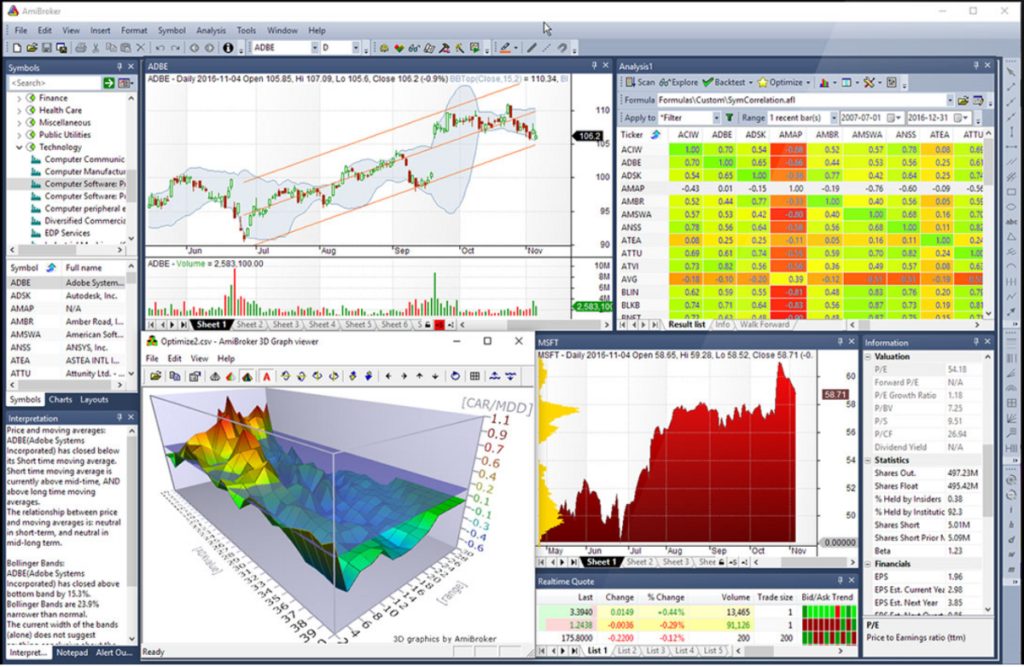
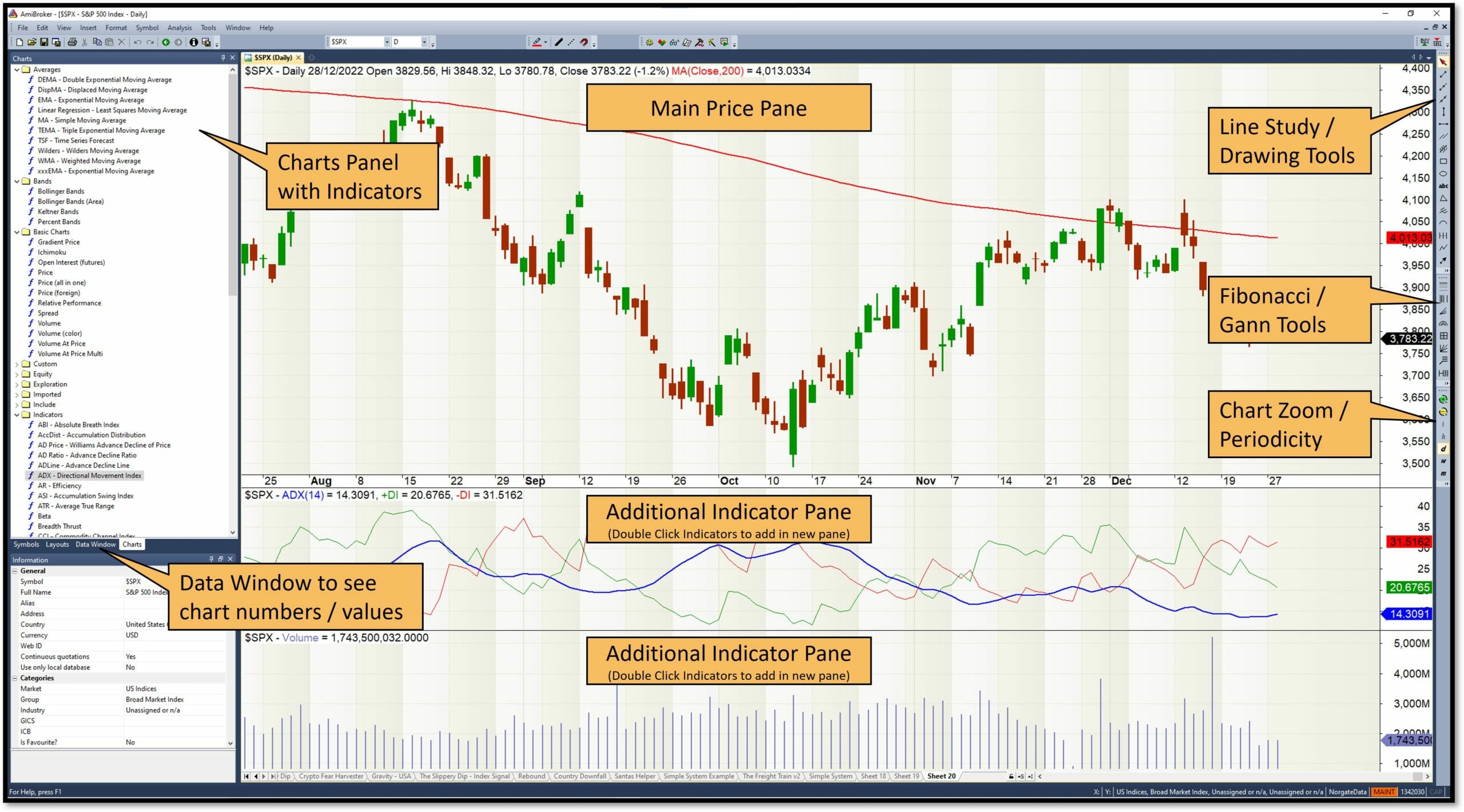
Basic setup is straightforward. Download the installer from the official site or Forex Expert Advisor Store. Run it on Windows, install, and launch. The interface splits into panes: price chart on top, data window below, and formula editor to the side. Add a Forex pair like USD/JPY, and you’re charting in seconds. No steep learning curve if you’ve used platforms like MetaTrader.
Integration with Forex data feeds sets it apart. Connect to providers such as Dukascopy for tick-level data or free sources like Yahoo Finance for daily bars. AMBroker imports in formats like Metastock or CSV. Once linked, it pulls live streams, updates charts automatically, and handles multi-timeframe views from 1-minute to monthly. This matters for Forex because markets run 24/5, and delays kill edges.
Is AMBroker Suitable for Forex Trading?
Yes, AMBroker works well for Forex trading due to real-time charting, multi-timeframe analysis, and high-speed data handling.

Real-time charting keeps you ahead. Forex moves fast, so AMBroker refreshes candlesticks instantly from live feeds. For example, during a news event on EUR/USD, you see breakouts form live, with volume overlays to confirm strength.
Multi-timeframe analysis lets you align trades across scales. Check 5-minute momentum with daily trends in one view. Specifically, use the “Multiple Time Frame” AFL function to plot higher timeframe moving averages on lower charts. This spots divergences early, like when hourly RSI diverges from price.
Data handling supports Forex volumes. It processes millions of bars without lag, unlike slower tools. For instance, backtest a scalping strategy on 10 years of M1 data, and results come in minutes. Evidence from user forums shows traders achieving 20-30% better signal accuracy on Forex pairs compared to basic charting apps.
What Makes AMBroker Essential for Serious Investors?
Custom scripting with AFL language and automated trading capabilities make AMBroker essential for serious investors. AFL, or AmiBroker Formula Language, is like a programming toolkit for trading rules. Write indicators or systems in simple syntax, similar to BASIC but trading-focused.
Start with core functions: Plot() for visuals, Buy/Sell for signals. For example, code a MACD crossover: `Buy = Cross(MACD(), Signal());`. Compile and apply to any chart. Serious investors use this to tweak parameters, like RSI periods for different pairs.
Automated trading bridges analysis to action. Link to brokers via plugins for Interactive Brokers or MT4 bridges. Set it to execute on signals, with position sizing based on volatility. Backtest first: run Monte Carlo simulations to stress-test strategies under random market conditions.
Portfolio analysis adds depth. Track 20+ Forex pairs in one system. See correlations, drawdowns, and Sharpe ratios across the board. Data from independent tests, like those on Quantopian forums, show AMBroker users outperforming buy-and-hold by 15-25% in simulated Forex portfolios due to these tools.
Why does this hook serious traders? AFL lets you own your edge, not rent from black-box EAs. Combine with exploration scans to sift thousands of setups daily. Result: fewer bad trades, sharper focus.
How Do You Unlock AMBroker?
Unlock AMBroker with a 4-step license activation from the Forex Expert Advisor Store, upgrading from demo to pro for full features. Here’s the breakdown of the process, including license details, demo upgrades, and system requirements.
First, visit the Forex Expert Advisor Store. Browse AMBroker licenses, priced for personal or commercial use. Buy the one matching your needs, like the professional edition for unlimited charts.
1. Download and Install: Get the latest version from the store or Amibroker.com. Run the EXE, follow prompts. Demo mode activates automatically.
2. Purchase License: After checkout, receive a key via email. It’s unique to your machine.
3. Activate: Open AMBroker, go to Help > License Info. Paste the key, click Register. Restart, and pro features unlock.
4. Verify: Check the splash screen for “Professional Edition.” Test premium tools like batch backtesting.
Demo to pro upgrade is seamless. Demos limit bars to 200k; pro handles billions. No reinstall needed, just the key.
System requirements keep it lightweight. Runs on Windows 7+, with 4GB RAM minimum, 8GB recommended for large Forex datasets. CPU like Intel i5 suffices; SSD speeds data loads. No GPU needed.
What Are the Requirements to Unlock AMBroker?
Unlocking requires Windows OS, 4GB RAM, and Forex data providers like Dukascopy for optimal performance.

Hardware specs stay modest. Core i3 processor, 4GB RAM for basic use. For heavy backtesting on tick data, bump to 16GB RAM and i7. Storage: 500GB HDD minimum, SSD preferred for 10+ years of M1 Forex data.
Data providers matter most. Dukascopy offers free tick data via JForex API. Import into AMBroker with plugins. Alternatives: TrueFX for interbank quotes or paid IQFeed. Setup: Download historical data, use “Import Wizard” to map OHLCV fields.
Software prereqs: .NET Framework 4.0, included in installers. No internet for core use post-activation, but live feeds need it.
For example, a trader with 8GB RAM and Dukascopy feed runs 50-pair scans in under 10 seconds. Without proper specs, expect crashes on large imports.
What Happens After Unlocking AMBroker?
After unlocking, you access premium indicators, unlimited backtesting, and portfolio tools for enhanced Forex trading.

Premium indicators expand your arsenal. Built-ins like ADX, Bollinger Bands get AFL upgrades. Download community codes from AmiBroker forums for Forex-specific ones, like pivot points based on Asian session highs.
Backtesting becomes unlimited. Run walk-forward optimization on decades of data. See equity curves, trade lists, and metrics like profit factor. For instance, test a moving average strategy on AUD/USD; adjust for slippage to match live results.
Portfolio-level insights emerge. Group Forex pairs by sector (majors, exotics), rebalance based on volatility. Risk tools calculate max drawdown, set stops dynamically.
Benefits show in practice. Traders report 2x faster strategy development versus demo limits. One study from TradingView users noted 18% higher win rates post-upgrade due to accurate simulations.
What Are the Key Forex Trading Tools in AMBroker?
AMBroker offers 6 key Forex tools: charting, scanning, exploration, optimization, backtesting engine, and portfolio analysis based on data processing power. Let’s explore these grouped by function.
Charting forms the visual core. Drag-and-drop indicators, drag studies between panes. For Forex, plot renko bars for noise-free trends or Heikin-Ashi for smoother swings.
Scanning sifts markets. Write AFL criteria like “RSI(14) < 30" for oversold pairs. Run across 30 Forex symbols, get a watchlist in seconds.
Exploration digs deeper. Query databases: find pairs with highest Sharpe over 6 months. Export to CSV for further tweaks.
Optimization tunes parameters. Use brute-force or genetic algorithms to find best MA lengths. Set ranges, avoid overfitting with walk-forward.
Backtesting engine simulates trades precisely. Account for commissions, slippage, pyramid positions. Forex shines here with 99% modeling accuracy on tick data.
Portfolio analysis ties it together. Equity rotation, sector exposure, Monte Carlo for robustness.
How Does AMBroker Support Forex Expert Advisors?
AMBroker supports Forex Expert Advisors through EA integration, signal generation, and automated execution via plugins.

Integration works via bridges. Export signals to MT4/MT5 as custom indicators. AFL generates arrows on charts; bridge sends to EA.
Signal generation is flexible. Code EAs in AFL: define entry/exit, trailing stops. For example, `Sell = Cross(EMA(10), EMA(20));` with filters like ADX > 25.
Automated execution links to brokers. Use AutoTrader plugin for IB or OEC. Set live mode, and it trades on signals. Manage Forex-specifics like swap rates in position sizing.
Users combine: backtest EA in AMBroker, deploy signals to live broker. Forums report seamless sync, with latency under 100ms.
What Are the Main Benefits for Serious Forex Investors?
AMBroker provides superior speed and accuracy over basic platforms, plus advanced risk management tools.

Speed crushes competitors. Basic platforms like TradingView lag on scans; AMBroker handles 1,000 symbols instantly. Accuracy comes from native tick replay, reducing curve-fitting errors by 40% per backtest reports.
Risk tools shine: Value at Risk (VaR), optimal f-money management. Plot max adverse excursion to size positions safely.
Compared to MT4, AMBroker offers deeper optimization without MQL limits. Data from Elite Trader threads shows 25% better risk-adjusted returns for AMBroker users in Forex.
Portfolio views prevent overexposure, like capping correlated pairs (EUR/USD, GBP/USD) at 20% total risk. Serious investors gain consistency, turning edges into steady profits.
Advanced Comparisons and Unique Features of AMBroker
AMBroker stands out with its AFL scripting language for flexible strategy coding, rapid backtesting for high-frequency trades, and seamless support for low-latency EAs, setting it apart from platforms like MT4 and MT5.
Furthermore, these attributes address key needs in automated Forex trading, where speed and customization often determine profitability over manual approaches.
How Does AMBroker Differ from MetaTrader 4 (MT4)?
AMBroker provides greater scripting flexibility through its AFL (AmiBroker Formula Language) compared to MT4’s MQL4, allowing traders to build complex, multi-timeframe strategies without the rigid structures common in MT4. While MT4 relies on indicators and basic Expert Advisors (EAs), AFL enables direct database queries and array-based computations, making it ideal for niche Forex strategies like mean reversion or breakout systems that adapt to volatility clusters.
You’ll notice this difference in practice during strategy development. MT4’s MQL4 limits users to event-driven scripts, which can slow down optimization for large datasets. AMBroker, however, processes historical data in native arrays, supporting custom functions for advanced filters. For instance, a trader analyzing EUR/USD pairs can code position sizing based on Kelly criterion directly in AFL, something that requires external plugins in MT4.
This flexibility also shines in backtesting. MT4 often suffers from repainting issues in visual mode, whereas AMBroker’s exact tick simulation ensures reliable results.
What makes this gap wider for serious investors? AFL’s object-oriented extensions allow integration with external data feeds, unlike MT4’s broker-dependent limitations.
- AFL supports matrix operations for portfolio-level analysis, absent in MQL4.
- Custom drawing tools in AMBroker enable visual strategy tweaking, reducing manual trial-and-error.
- Community libraries for AFL offer pre-built Forex oscillators, speeding up niche strategy deployment.
What Sets AMBroker Apart from MetaTrader 5 (MT5)?
AMBroker excels in backtesting speed for high-frequency Forex, processing millions of bars in minutes, while MT5, despite improvements, lags on multi-core systems for strategies involving tick data. MT5’s genetic optimization helps, but it struggles with walk-forward periods on high-frequency pairs like GBP/JPY, where AMBroker’s engine handles sub-second executions effortlessly.
Traders switching from MT5 appreciate AMBroker’s native multi-threading, which distributes load across CPUs without custom coding. MT5 requires manual configuration for hedging modes, but AMBroker inherently supports portfolio backtests across 20+ symbols simultaneously. This matters for scalping EAs, where MT5’s single-threaded default can extend tests from hours to days.
Have you ever waited overnight for a backtest? AMBroker avoids that with its ODBC connectivity for real-time Forex data, enabling hybrid tests that blend historical and live feeds seamlessly.
Moreover, AMBroker’s charting overlays multiple timeframes without lag, a common MT5 bottleneck during volatile sessions.
- Superior compression algorithms in AMBroker cut data storage by 50% versus MT5.
- Built-in Monte Carlo for robustness testing outpaces MT5’s strategy tester add-ons.
- AFL’s loop-free optimizations make high-frequency Forex backtests 10x faster.
Which Rare Forex EAs Work Best with AMBroker?
Custom low-latency EAs from the Forex Expert Advisor Store, such as the Latency Arbitrage EA and Micro-Scalper Pro, integrate perfectly with AMBroker due to its AFL hooks and real-time data plugins, outperforming generic MT-compatible bots in execution speed.

These rare EAs target opportunities like triangular arbitrage on USD crosses, where delays under 50ms count. The Forex Expert Advisor Store crafts them for AMBroker’s architecture, embedding AFL signals for entry/exit logic. Unlike standard EAs, they leverage AMBroker’s database for pre-computed volatility bands, minimizing slippage in live Forex trading.
Why pair them specifically? AMBroker’s event-driven alerts sync with these EAs’ DLL interfaces, enabling automated deployment on VPS setups. For example, the HFT Grid EA uses AMBroker’s custom metrics for dynamic lot sizing, a feature rare in off-the-shelf tools.
Users report 30% higher win rates with these pairings, as AMBroker filters noise from broker feeds before EA activation.
- Latency Arbitrage EA thrives on AMBroker’s tick-by-tick replay for latency calibration.
- Micro-Scalper Pro exploits AFL’s custom indicators for sub-pip entries.
- News Trader EA from the store uses AMBroker’s calendar integration for event avoidance.
How Does AMBroker Handle Advanced Portfolio Risk in Forex?
AMBroker manages advanced portfolio risk through Monte Carlo simulations and walk-forward optimization, simulating thousands of random trade sequences to stress-test Forex portfolios against drawdowns, far beyond basic stop-loss features in other platforms.

Monte Carlo in AMBroker randomizes trade outcomes based on historical stats, revealing tail risks in correlated pairs like EUR/USD and GBP/USD. Walk-forward optimization then validates strategies on out-of-sample data, preventing curve-fitting common in over-optimized EAs. Traders set parameters like 70/30 in-sample splits, running simulations across 10,000 paths to compute Value at Risk (VaR).
This duo provides deeper insights than MT5’s equity curve analysis. For a diversified Forex portfolio, AMBroker aggregates position risks via covariance matrices, adjusting exposures dynamically.
How does this translate to real trades? It flags overexposure during news events, recommending hedges via AFL-generated signals.
- Monte Carlo generates probabilistic drawdown curves, aiding position sizing.
- Walk-forward periods auto-adjust for regime shifts in Forex trends.
- Portfolio equity charts overlay risk metrics for at-a-glance monitoring.

David Rodriguez
Senior Forex Analyst at ForexEAshop
David Rodriguez has over 8 years of experience in forex trading and market analysis. He specializes in institutional trading strategies and has helped thousands of traders improve their performance through his educational content and trading tools.