

What is Bonnitta EA?
Bonnitta EA is a robot trading based on Pending Position strategy (PPS) and a very advanced secretive trading algorithm. EA combination of a secretive custom indicator, Trendlines, Support & Resistance levels (Price Action) and most important secretive trading algorithm mentioned above, use trading on Meta Trader 4. Simultaneously, the Expert Advisor contains the algorithm of statistics collection and slippage control with complete statistics control; this information is used to protect you from broker’s tricks.
Vendor website:https://www.mql5.com/en/market/product/52210

Original price: $5500
ForexEAshop price: $19 (You Save 99%)
Key Takeaways
- Bonnitta EA is a highly advanced and secretive trading algorithm that has been extensively tested on real money for over two year.
- The latest update of Expert Advisor (EA) includes features such as manual buttons for trade management, trailing stop in pips, different open positions modes, and the ability to select timeframes, enhancing traders’ control and flexibility.
Bonnitta EA Setting / Features
- Used on platform : Meta Trader 4
- Currency pairs: EURUSD, EURCHF, EURGBP
- Timeframe: H1
- Recommend deposit 1000 USD – 0.01 and 3 Pairs and Trading 2 pairs at same time
- News Filter and Auto GMT Time are supported
🚀 Recommend Use VPS Forex
To keep Experts Advisor running smoothly 24/7, use a quality Forex VPS. Optimize trading efficiency, no worries about interruptions!
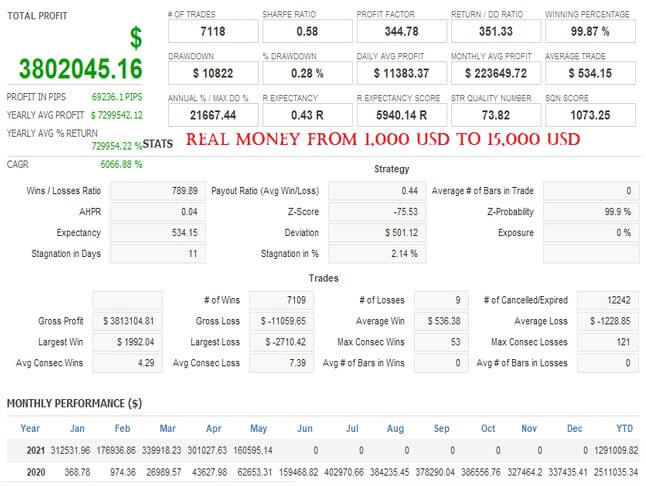
Register VPS NowBonnitta EA Results

How to install and run the Bonnitta EA Trading Bot in Metatrader 4?
- Open the Metatrader 4 platform
- From the top menu, click on “File”
- Now click on “Open Data Folder”
- Open the “MQL4” folder
- Open the “Experts” folder
- Copy the Bonnitta v1.42.ex4 file here
- Then close and restart the MT4 platform
- Attach the Expert Advisor to the chart
Now, you are ready to start using the Bonnitta v1.42 MT4!
If you have any questions regarding EA installation, you can view the information in the Help Center to assist you in installing the EA: Click to view
You can watching How to video set Bonnitta:
Bonnitta EA Download
Link download Bonnitta EA v1.42 MT4 Without DLL will be sent to your email after purchase.
Installation guide (if any) will be sent immediately via email after your purchase, or you can directly download it from the website, under the section: My account -> Download.
Updated June 12, 2024: Bonnitta EA v1.42 MT4 Without DLL Build 1420+ ( Without DLL )
+ Expert Advisor Download :
- Bonnitta EA v1.42.ex4
- Unlimited / NoDLL / Indicator / Build New
- Free 1 Year Updates (If there is a new update, please check in the download on the forexeashop website or you can contact us via Email or Telegram Lucas Jason and provide proof of purchase, we will send you the update)
Shopping Guide and Important Information
We Accept Payment: Cryptocurrency, USDT, Binance Pay, Skrill, Paypal: Click to view
More payment methods please contact: Email or Telegram Admin.
Cryptocurrency, PayPal: Our website checkout system automated.
Memo: Your email + EA name
EA will be send to your email ASAP. The download link will be sent to your email within 5 minutes after the order is confirmed.
Some EAs will need to wait a few hours to up to 12 hours to receive the download link.
Please read and agree to the information below before purchasing our products:
Beginner traders should research and learn about trading before using any EAs.
Please make sure you understand the risks involved with trading and that past performance is no guarantee for future results. (EA could also make losses).
The product does not guarantee profits and demands resilience, patience, and a positive attitude in forex trading.
Before use, please test the EA on a demo account first.
Happy trading!


Reviews
There are no reviews yet.