
What is Cyborg EA?
Cyborg EA is a combination of human and machine, the idea is of combining human analytical understanding with computational trading and risk management capabilities. Forex Cyborg EA offers outstanding flexibility on multiple currency pairs, timeframes and profit targets. It is requires some trading experience and it not intended for the use of beginners, it is made for traders who achieve stable and reliable profits. Human decision making and algorithmic control, provides a consistent and profitable approach to trading in the market, It is considered the leading solution and best tool on the market helps traders to make consistent profits.
Vendor website: https://breakergang.com/product/cyborg-mt4-ea/

Original price: $799
ForexEAshop price: $19 (You Save 97%)
Key Takeaways
- Cyborg EA is to harmoniously combine human decision-making skills with algorithmic management
- It is a grid/martingale EA that allows flexibility in pairs, timeframes, and profit targets
- It can be used to pass prop firm accounts, but not all prop firms allow grid/martingale styles
This EA has DLL files. If you know that how to use DLL, old terminal version and how to stop auto update in Metatrader then you can buy. Easy way you should rent a VPS Windows to setup EA on it, I will guide you (record setup video or help you setup via AnyDesk). Otherwise don’t buy!
Please read this note carefully before purchasing and using EA with DLL: If you know how to use DLL from the old terminal version and how to disable automatic updates in Metatrader, you can buy it. Or if you do not know how to install, visit Help Center, we will show you the instructions for installing EA with DLL. Don’t worry, if you see it but still cannot do it successfully, please contact Admin Lucas Jason to support you with the installation via AnyDesk.
Cyborg EA Features
- EA is flexible in terms of pairs, timeframes
- Platform: MetaTrader 4
- Minimum deposit: If you’re working with less than $1000, then we suggest using a cent account. Cent accounts offer more flexibility in terms of lot sizes for smaller accounts. 1 cent lot = 0.01 standard lot, so you can use lots smaller than 0.01
🚀 Recommend Use VPS Forex
To keep Experts Advisor running smoothly 24/7, use a quality Forex VPS. Optimize trading efficiency, no worries about interruptions!
Register VPS NowCyborg EA Backtesting
The video below shows how to backtest Forex Cyborg EA review on your terminal using the following excel sheet to measure maximum drawdown.
Use the following excel sheet to measure maximum drawdown.
Link file download : Drawdown calculator
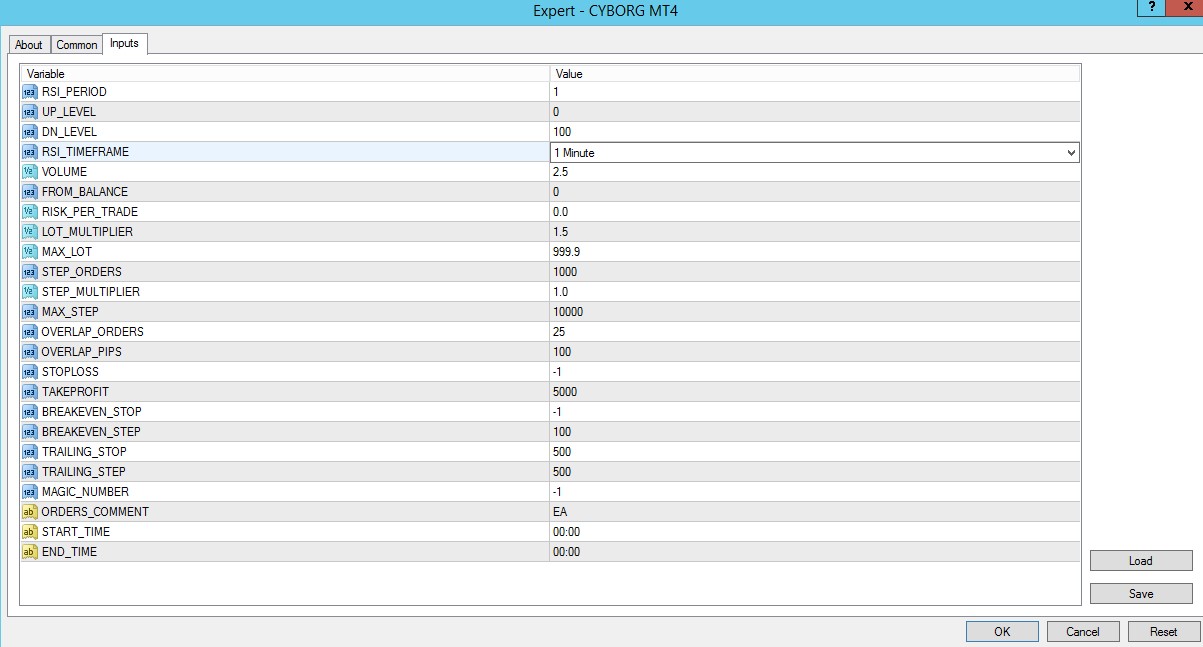
Cyborg EA Setting
Forex Cybord EA The settings use as soon as the volume slows down during the New York session and change it to the following STOP setting.

How to install and run the Cyborg EA Trading Bot have DLL in Metatrader?
- Some EA has DLL from unknown developers will be mistakenly labeled as malicious and removed by Defender or Antivirus.
- So you need turn off antivirus or windows defender protect to download and use.
- You should use VPS and you turn off antivirus or windows defender protect on VPS to use.
- Next time you reopen the VPS, you don’t need to do anything about it anymore, Without DLL, there is no need to disable it.
Please read this note carefully before purchasing and using EA with DLL: If you know how to use DLL from the old terminal version and how to disable automatic updates in Metatrader, you can buy it. Or if you do not know how to install, visit Help Center, we will show you the instructions for installing EA with DLL. Don’t worry, if you see it but still cannot do it successfully, please contact Admin Lucas Jason to support you with the installation via AnyDesk.
Cyborg EA Download
Link download Cyborg EA MT4 v1.10 With Setfiles will be sent to your email after purchase.
Installation guide (if any) will be sent immediately via email after your purchase, or you can directly download it from the website, under the section: My account -> Download.
+ Expert :
- Cyborg EA v1.10.ex4
- Unlimited / DLL / Presets
- Free 1 Year Updates (If there is a new update, please check in the download on the forexeashop website or you can contact us via Email or Telegram Lucas Jason and provide proof of purchase, we will send you the update)
This EA has DLL files. If you know that how to use DLL, old terminal version and how to stop auto update in Metatrader then you can buy. Easy way you should rent a VPS Windows to setup EA on it, I will guide you (record setup video or help you setup via AnyDesk). Otherwise don’t buy!
Shopping Guide and Important Information
We Accept Payment: Cryptocurrency, USDT, Binance Pay, Skrill, Paypal: Click to view
More payment methods please contact: Email or Telegram Admin.
Cryptocurrency, PayPal: Our website checkout system automated.
Memo: Your email + EA name
EA will be send to your email ASAP. The download link will be sent to your email within 5 minutes after the order is confirmed.
Some EAs will need to wait a few hours to up to 12 hours to receive the download link.
Please read and agree to the information below before purchasing our products:
Beginner traders should research and learn about trading before using any EAs.
Please make sure you understand the risks involved with trading and that past performance is no guarantee for future results. (EA could also make losses).
The product does not guarantee profits and demands resilience, patience, and a positive attitude in forex trading.
Before use, please test the EA on a demo account first.
Happy trading!


Reviews
There are no reviews yet.