


What is Nebula Cartographer AI EA?
Nebula Cartographer AI EA is a fully automated MetaTrader 5 Expert Advisor specifically developed for XAUUSD trading, combining market structure analysis, multi-timeframe trend identification, and a structured four-level grid recovery system. The algorithm evaluates price action across multiple timeframes to identify important market levels, detect momentum continuation opportunities, and initiate positions during favorable pullbacks. Unlike traditional unrestricted grid systems, the EA limits recovery entries to four additional positions and applies a predefined hard Stop Loss to each trading basket, helping establish a measurable risk boundary for every trading sequence. The trading system supports fixed lot sizing and equity-based position calculations, allowing traders to configure exposure according to their account balance and risk preferences. Its integrated basket management, configurable trading sessions, economic news filtering, and optional recovery controls provide a systematic framework for automated Gold trading while maintaining defined position management rules.
Vendor website: https://www.mql5.com/en/market/product/199222

Original price: $299
ForexEAshop price: $19 (You Save 94%)
Key Takeaways
- Nebula Cartographer AI EA combines multi-timeframe market structure analysis, momentum continuation entries, and a controlled four-level grid strategy with predefined basket Stop Loss protection and no standard Martingale lot multiplication.
- The automated software supports a maximum of five positions per trading basket, including the initial entry and four recovery orders, with fixed lot or equity-based sizing and configurable maximum basket losses to manage accumulated exposure.
- The system is designed exclusively for XAUUSD, can operate on any chart timeframe through internal multi-timeframe analysis, and recommends a starting balance of $500 for 0.01 fixed lot, with optional news filtering, trading session controls, and live signal monitoring available for strategy evaluation.
Nebula Cartographer AI EA Features
- Used on platform: Meta Trader 5.
- Currency pairs: XAUUSD (Gold).
- Time frame: H1.
- Minimum deposit: $500.
- Recommend use leverage: 1:100 or higher.
- Expert Advisor trading automated 100%.
- Account Type: Standard, ECN, Raw, Cent.
- Risk: start with a low profile and assess the EA on your own account before increasing it.
- Prop Firm Ready: configure risk to match your firm’s trading rules and drawdown limits.
🚀 Recommend Use VPS Forex
To keep Experts Advisor running smoothly 24/7, use a quality Forex VPS. Optimize trading efficiency, no worries about interruptions!
Register VPS NowNebula Cartographer AI EA Review
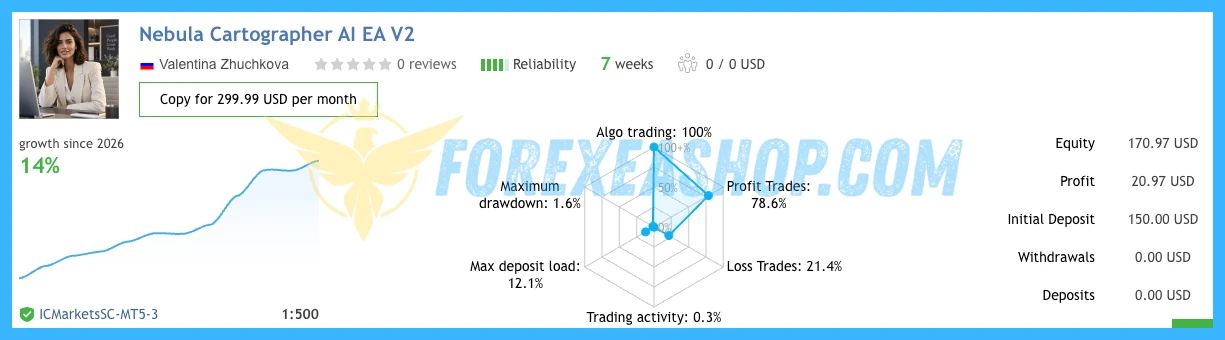
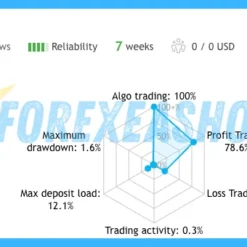
Nebula Cartographer AI EA was officially published on the MQL5 Market on May 12, 2026, with version 3.41 released on August 15, 2026, following several development updates addressing grid execution, trading signals, session filtering, and risk management functionality. The Expert Advisor has received mixed marketplace feedback, with some traders highlighting its market structure entries, predefined basket risk, and responsive developer support, while others report substantial losses when basket Stop Loss levels are reached. The developer provides publicly monitored trading signals for evaluating historical transactions and drawdown behavior, although individual customer experiences and relatively limited live monitoring cannot establish consistent future profitability.

Signal EA on link: Click to view
Why should you use Nebula Cartographer AI EA?
Nebula Cartographer AI EA offers a structured approach to automated XAUUSD trading by combining trend-oriented market analysis with controlled grid recovery, predefined basket loss limits, and configurable position sizing. Its multi-timeframe entry logic, fixed and equity-based risk models, automated basket management, and additional trading filters provide practical tools for traders seeking systematic Gold market participation while maintaining visibility into potential recovery exposure.
Advanced Multi-Timeframe Market Structure Analysis: Analyzes price behavior across multiple timeframes to identify prevailing market direction, important price levels, and potential entry zones during momentum continuation phases. The algorithm focuses on pullback opportunities within established market structures rather than entering positions exclusively through fixed time intervals or random price fluctuations.
Structured Four-Level Grid Recovery System: Uses a controlled grid management framework with a maximum of four additional recovery positions following the original entry, creating a maximum structure of five positions per trading basket. The standard fixed-lot configuration can maintain equal position sizes across the basket, such as five individual 0.01-lot orders, avoiding exponential Martingale multiplication while still increasing total market exposure as additional trades are opened.
Predefined Maximum Basket Stop Loss Protection: Applies a predefined hard Stop Loss to each trading basket, establishing a configured loss threshold for the combined original position and subsequent recovery entries. The developer describes two example risk models for a $1,000 account using 0.01 fixed lot, with basket loss thresholds of $150 and $100 respectively, allowing traders to select between different recovery characteristics and maximum intended exposure.
Flexible Fixed Lot and Equity-Based Risk Management: Supports fixed trading volumes and equity-based automatic position sizing, allowing traders to configure order sizes according to their preferred money management approach. Additional fallback lot settings and maximum drawdown controls help accommodate broker volume limitations and changing account equity, although the total exposure of all positions within a basket must be considered when selecting initial trading volume.
Independent Trading Signals and Session Configuration: Provides two separate trading signal groups identified through individual Magic Numbers, allowing traders to activate one signal group or operate both according to their preferred strategy configuration. Configurable trading sessions use broker server time to define permitted operating periods, while additional session restrictions can help avoid opening new positions during selected market conditions.
Economic News Filtering and Recovery Monitoring: Includes a high-impact economic news filter based on the MetaTrader 5 economic calendar, allowing traders to restrict new original entries around important USD announcements while maintaining management of existing trading baskets. An integrated trading information panel displays operating status, upcoming position size, basket risk, news filter activity, and recovery status, while an optional aggressive recovery module can increase trading volume after a basket loss and should be used cautiously because it raises potential drawdown.
Trading Specifications
Recommended settings and parameters to pay attention to from developers and experts:
| Trading platform | MetaTrader 5 (MT5) |
| Currency pairs | XAUUSD (Gold) |
| Time frame | H1 |
| Minimum deposit | $500 |
| Recommend leverage | 1:100 or higher |
| Setup files | Default settings |
| Product type | Without DLL / Unlimited / 1 Year Updates Included |
| Recommend Broker | Exness Broker / ICMarket Broker / Tickmill / Roboforex |
| Virtual Private Server (VPS) | FXVM Forex VPS provides reliable Windows VPS solutions optimized for MT4/MT5, helping keep Expert Advisors and automated trading platforms online 24/7 |
How to install and run the Nebula Cartographer AI EA Trading Bot in Metatrader 5?
- Open the Metatrader 5 platform
- From the top menu, click on File
- Now click on Open Data Folder
- Open the MQL5 folder
- Open the Experts folder
- Copy the Nebula Cartographer AI EA.ex5 file here
- Then close and restart the MT5 platform
- Attach the Expert Advisor to the chart
- Now, you are ready to start using the Nebula Cartographer AI EA v1.0 MT5.
If you have any questions regarding EA installation, you can view the information in the Help Center to assist you in installing the EA: Click to view
Nebula Cartographer AI EA Download Package
Link download Nebula Cartographer AI EA v1.0 MT5 will be sent to your email after purchase.
Installation guide (if any) will be sent immediately via email after your purchase, or you can directly download it from the website, under the section: My account -> Download.
+ Expert Advisor Download:
- Nebula Cartographer AI EA.ex5
- Unlimited / NoDLL / Build New
- 1 Year Updates Included (If there is a new update, please check in the download on the forexeashop website or you can contact us via Email or Telegram Lucas Jason and provide proof of purchase, we will send you the update)
Conclusion
Nebula Cartographer AI EA trading solution for MetaTrader 5, combining multi-timeframe market structure analysis with momentum continuation entries and controlled four-level grid management. Its predefined basket Stop Loss protection, configurable position sizing, economic news filtering, and flexible trading schedules offer a structured framework for managing Gold trading opportunities while limiting the number of recovery positions. The Expert Advisor also supports independent trading signals, fixed and equity-based risk models, and optional recovery functionality, making it relevant for experienced traders who understand grid-based strategies and their associated margin requirements. Before live deployment, review the recommended $500 starting balance for 0.01 fixed lot, configure an appropriate basket loss threshold, examine the developer’s live trading signals, and consider keeping aggressive recovery features disabled until their risk implications are fully understood. Test the system extensively using the MetaTrader 5 Strategy Tester and an independent demo account, paying particular attention to prolonged Gold trends, cumulative grid exposure, execution slippage, basket Stop Loss events, and maximum account drawdown before committing real capital.
Frequently Asked Questions (FAQs)
What platform does Nebula Cartographer AI EA use?
Nebula Cartographer AI EA is developed for MetaTrader 5 and operates as an automated Expert Advisor specializing in XAUUSD Gold trading. The software combines multi-timeframe market structure analysis, momentum continuation entries, and a structured grid recovery system with predefined basket Stop Loss protection.
Which trading instrument and timeframe are recommended?
The Expert Advisor is specifically designed for XAUUSD Gold and can operate on any MetaTrader 5 chart timeframe because its internal strategy automatically analyzes multiple timeframes. Traders should attach the EA to their broker’s Gold symbol and verify the trading parameters before enabling automated execution.
What is the recommended minimum deposit and leverage?
The developer recommends a starting account balance of $500 when using a fixed initial position size of 0.01 lot, with example basket loss thresholds between $100 and $150. No mandatory leverage requirement is specified, so traders should calculate available margin according to their broker’s Gold contract specifications and the maximum exposure of five simultaneous positions.
How does the Expert Advisor manage trading risk and drawdown?
The trading system combines predefined basket Stop Loss protection, fixed or equity-based position sizing, configurable trading sessions, and economic news filtering to manage entry conditions and accumulated exposure. The documented basket risk models include intended maximum losses of $100 or $150 for a 0.01-lot configuration on a $1,000 account, although actual losses can exceed configured thresholds during market gaps, extreme volatility, or unfavorable execution.
Does Nebula Cartographer AI EA use Grid or Martingale trading strategies?
The Expert Advisor explicitly uses a structured four-level grid recovery system that can open four additional positions after the original trade, while its standard configuration avoids exponential Martingale lot multiplication. However, the optional aggressive recovery module can increase position sizes after a basket Stop Loss event, so traders should recognize that grid exposure and recovery multipliers can significantly increase drawdown and margin consumption.
Does the Expert Advisor require a VPS and support economic news filtering?
A stable VPS is recommended for uninterrupted MetaTrader 5 operation, continuous position monitoring, and reliable management of open trading baskets, although it is not a mandatory installation requirement. The EA includes an optional economic news filter for restricting new entries around high-impact USD announcements, alongside configurable trading sessions and an information panel displaying active risk and operating conditions.
Shopping Guide and Important Information
We Accept Payment: Cryptocurrency, USDT, Binance Pay, Skrill, Paypal: Click to view
More payment methods please contact: Email or Telegram Admin.
Cryptocurrency, PayPal: Our website checkout system automated.
Memo: Your email + EA name
EA will be send to your email ASAP. The download link will be sent to your email within 5 minutes after the order is confirmed.
Some EAs will need to wait a few hours to up to 12 hours to receive the download link.
Please read and agree to the information below before purchasing our products:
Term & Condition
Refund Policy
Privacy Policy
Beginner traders should research and learn about trading before using any EAs.
Please make sure you understand the risks involved with trading and that past performance is no guarantee for future results. (EA could also make losses).
The product does not guarantee profits and demands resilience, patience, and a positive attitude in forex trading.
Before use, please test the EA on a demo account first.
Happy trading.


Reviews
There are no reviews yet.