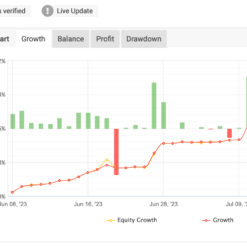


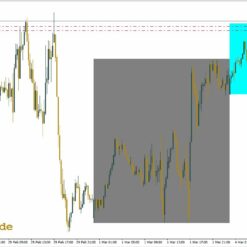
What is Sumber Rejeki Autotrade?
Sumber Rejeki Autotrade is an advanced Expert Advisor meticulously engineered for the MetaTrader 4 platform. Leveraging a myriad of sophisticated techniques, it meticulously pinpoints optimal entry and exit points, resulting in an impressive win rate. This EA thrives when trading major currency pairs across the M15 timeframe, offering versatility and agility in the dynamic forex market. With a minimum deposit requirement of $200, it ensures accessibility for traders of varying capital levels. For seamless operation, utilizing a Virtual Private Server (VPS) is highly recommended, guaranteeing uninterrupted trading performance.
Vendor website: http://www.galeri-forex.com/expert-advisor/sumberrejeki

Original price: $900
ForexEAshop price: $19 (You Save 98%)
Key Takeaways
- Sumber Rejeki Autotrade is an advanced Expert Advisor designed for MetaTrader 4, offering a high win rate and suitability for major currency pairs on the M15 timeframe.
- Expert Advisor requires a minimum deposit of $200, making it accessible to traders with varying capital levels, and is best operated using a Virtual Private Server (VPS) for uninterrupted performance.
- Leveraging sophisticated techniques, this EA excels in pinpointing optimal entry and exit points, showcasing versatility and agility in the dynamic forex market.
Sumber Rejeki Autotrade Setting / Feature
- Used on platform: Meta Trader 4
- Support any major pairs.
- Time frame: M15.
- Minimum deposit : $200
🚀 Recommend Use VPS Forex
To keep Experts Advisor running smoothly 24/7, use a quality Forex VPS. Optimize trading efficiency, no worries about interruptions!
Register VPS Now
How to install and run the Sumber Rejeki Autotrade Trading Bot in Metatrader 4?
- Open the Metatrader 4 platform
- From the top menu, click on “File”
- Now click on “Open Data Folder”
- Open the “MQL4” folder
- Open the “Experts” folder
- Copy the Sumber Rejeki AutoTrade v2.3_fix.ex4 file here
- Then close and restart the MT4 platform
- Attach the Expert Advisor to the chart
Now, you are ready to start using the Sumber Rejeki Autotrade v2.3 MT4 Without Setfiles!
If you have any questions regarding EA installation, you can view the information in the Help Center to assist you in installing the EA: Click to view
Sumber Rejeki Autotrade Download
Link download Sumber Rejeki Autotrade v2.3 MT4 Without Setfiles will be sent to your email after purchase.
Installation guide (if any) will be sent immediately via email after your purchase, or you can directly download it from the website, under the section: My account -> Download.
+ Expert Advisor Download :
- Sumber Rejeki AutoTrade v2.3_fix.ex4
- Unlimited / NoDLL / Presets / Build New
- Free 1 Year Updates (If there is a new update, please check in the download on the forexeashop website or you can contact us via Email or Telegram Lucas Jason and provide proof of purchase, we will send you the update)
Sumber Rejeki AutoTrade v2.3_fix.ex4
SumberRejeki PairFx M15.set
Shopping Guide and Important Information
We Accept Payment: Cryptocurrency, USDT, Binance Pay, Skrill, Paypal: Click to view
More payment methods please contact: Email or Telegram Admin.
Cryptocurrency, PayPal: Our website checkout system automated.
Memo: Your email + EA name
EA will be send to your email ASAP. The download link will be sent to your email within 5 minutes after the order is confirmed.
Some EAs will need to wait a few hours to up to 12 hours to receive the download link.
Please read and agree to the information below before purchasing our products:
Beginner traders should research and learn about trading before using any EAs.
Please make sure you understand the risks involved with trading and that past performance is no guarantee for future results. (EA could also make losses).
The product does not guarantee profits and demands resilience, patience, and a positive attitude in forex trading.
Before use, please test the EA on a demo account first.
Happy trading!


Reviews
There are no reviews yet.