
What is Weis Wave With Alert?
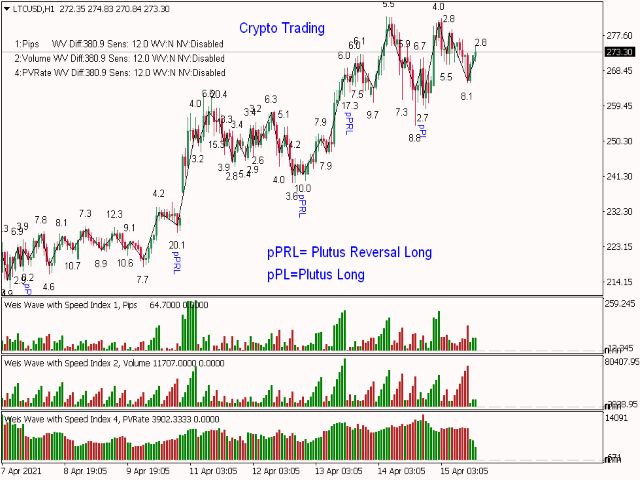
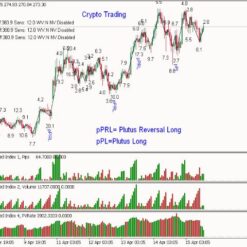
Weis Wave With Alert indicator is rooted in the foundational principles of Richard D. Wyckoff’s theory, offering traders a sophisticated tool for market analysis. Compatible with various timeframes, range bar charts, and tick bar charts, it boasts versatility across multiple markets. This indicator represents an evolution of the classic Weis Wave, introducing innovative features such as autowaves, five distinct wave types, and the robust Speed Index. Each price wave exhibits a clear directional movement until it undergoes a reversal. To trigger a reversal in the indicator wave, the price must surpass a predefined number of points, typically expressed as pip*10, as specified in the parameters. While the last wave may repaint, the underlying premise of this trading method revolves around forecasting market movements by analyzing past wave patterns.
Vendor website: https://www.mql5.com/en/market/product/29677?source=External

Original price: $599
ForexEAshop price: $14 (You Save 97%)
Key Takeaways
- Weis Wave With Alert is a trading indicator based on the theory of Richard D. Wyckoff, applicable to various markets and time frame.
- It identifies price waves and their reversals, providing automatic wave detection and five different wave types, including a powerful speed index.
- The indicator aims to predict market direction by analyzing previous price waves and requires adjustments based on volume and pip thresholds.
Weis Wave With Alert Setting / Feature
- Used on platform: Meta Trader 4
- Compatible with various currency pairs and time frame.
- Volume Alert above this limit: The value of cumulative volume that will be triggered if the alert is exceeded.
- Alerts: Popup, Sound, Email, Push.
- VolDivBy: Volume divider in order to avoid big numbers on the display.
- PipDivBy: Pip distance divider in order to avoid big numbers on the display.
- SI Multiplier: Speed Index multiplier for better display..
- Reverse_style: negative down waves.
- Location of parameters to be displayed (Corner, Y offset, X offset, Font, Font Size).
🚀 Recommend Use VPS Forex
To keep Experts Advisor running smoothly 24/7, use a quality Forex VPS. Optimize trading efficiency, no worries about interruptions!
Register VPS Now

Weis Wave With Alert Review
Weis Wave With Alert Install
Setup Parameters:
- Indicator Number: Multiple Indicators can be added on the same chart. Valid values “0 to 9” and “a-z”
- Show Orders: display or not your orders
- Difference: Number of points required for the current wave to reverse and form a new wave
- AutoDifference: true/false – Neglects the Difference parameter and adjusts the Difference automatically creating more accurate waves.
- AutoSensitivity: The higher the number the higher the sensitivity and therefore more waves are formed.
- Weighted Volume: true/false – Weights volume of different sessions taking into consideration that when London and US are operating at same time have the highest volume of all sessions occurs and adjusts the rest of the sessions. With this parameter it very easy visualize which volumes are significant even on Asian hours or non-significant on London-US hrs.
- Not to be used with constant tick charts.
- Net Volume: 0-Disabled, 1-Price Close, 2 Price Median
- Wave Type: 0-Regular Volume, 1-Pips, 2 Progressive Volume Rate. 3-Time, 4- Emphasized Volume Waves, 5 – Inverse Progressive Pip Rate
How to install and run the Weis Wave With Alert Trading Bot in Metatrader 4?
- Open the Metatrader 4 platform
- From the top menu, click on “File”
- Now click on “Open Data Folder”
- Open the “MQL4” folder
- Open the “Experts” folder
- Copy the Weis Wave With Alert file here
- Then close and restart the MT4 platform
- Attach the Expert Advisor to the chart
Now, you are ready to start using the Weis Wave With Alert v10.0 MT4 Without DLL!
If you have any questions regarding EA installation, you can view the information in the Help Center to assist you in installing the EA: Click to view
Weis Wave With Alert Download
Link download Weis Wave With Alert v10.0 MT4 Without DLL will be sent to your email after purchase.
Installation guide (if any) will be sent immediately via email after your purchase, or you can directly download it from the website, under the section: My account -> Download.
Updated June 08, 2024: Weis Wave With Alert v10.0 MT4 Without DLL Build 1420 ( Without DLL)
+ Expert Advisor Download :
- Weis Wave With Alert v10.0.ex4 Indicator
- Unlimited / NoDLL / Build New
- Free 1 Year Updates (If there is a new update, please check in the download on the forexeashop website or you can contact us via Email or Telegram Lucas Jason and provide proof of purchase, we will send you the update)
Shopping Guide and Important Information
We Accept Payment: Cryptocurrency, USDT, Binance Pay, Skrill, Paypal: Click to view
More payment methods please contact: Email or Telegram Admin.
Cryptocurrency, PayPal: Our website checkout system automated.
Memo: Your email + EA name
EA will be send to your email ASAP. The download link will be sent to your email within 5 minutes after the order is confirmed.
Some EAs will need to wait a few hours to up to 12 hours to receive the download link.
Please read and agree to the information below before purchasing our products:
Beginner traders should research and learn about trading before using any EAs.
Please make sure you understand the risks involved with trading and that past performance is no guarantee for future results. (EA could also make losses).
The product does not guarantee profits and demands resilience, patience, and a positive attitude in forex trading.
Before use, please test the EA on a demo account first.
Happy trading!


Reviews
There are no reviews yet.