


What is Golden Pickaxe EA?
Golden Pickaxe EA is a mean-reversion grid trading system that uses machine learning technology to place high-profit potential trades on market, use trading on Meta Trade 4, trading currency pairs GOLD, Timeframe M1. Golden Pickaxe EA uses real market inefficiencies to its advantage to have an edge over the market. The EA very easy can choose the default option (XAU Risky) or have your own preference.
Vendor website: https://www.mql5.com/en/market/product/74692

Original price: $750
ForexEAshop price: $19 (You Save 99%)
Key Takeaways
- Golden Pickaxe EA is a high-performance mean-reversion grid trading system that utilizes machine learning technology to capitalize on market inefficiencies in the Gold market.
- The EA offers flexible customization options, solid backtesting and live performance, and a statistic panel with a self-diagnostic system and neural network forecast indicator.
- It is recommended to run Golden Pickaxe EA on a VPS continuously, use a good ECN broker, and adjust risk settings based on leverage and account size.
Golden Pickaxe EA Features
- Used on platform : Meta Trader 4
- Supported currency pairs: XAUUSD (GOLD)
- Timeframe: M1
- Allows you to retrain Neural Network on your broker’s data
- Advanced News and Stock Market Crash Filter
- Flexible customization with a lot of filters and options
- Solid backtestandlive performance
- Statistic Panel with Self Diagnostic System and Neural Network Forecast indicator
- Very easy to use
🚀 Recommend Use VPS Forex
To keep Experts Advisor running smoothly 24/7, use a quality Forex VPS. Optimize trading efficiency, no worries about interruptions!
Register VPS NowRequirements:
- Golden Pickaxe EA is NOT sensitive to spread and slippage. But I advise using a good ECN broker
- The Expert Advisor (EA) should run on a VPS continuously
- With only 1:30 leverage I advise not to use higher than low risk settings on a less than $6000 account, otherwise you might have problems with free margin. With 1:100 leverage it should be fine with up to significant risk setting on a $1000 account

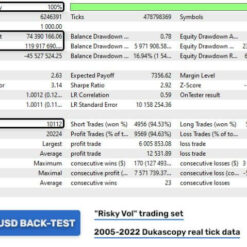
Golden Pickaxe EA Back Test
The back test results that Golden Pickaxe EA conducted over a long period of time demonstrate growth and stability in profits.


Golden Pickaxe EA Review
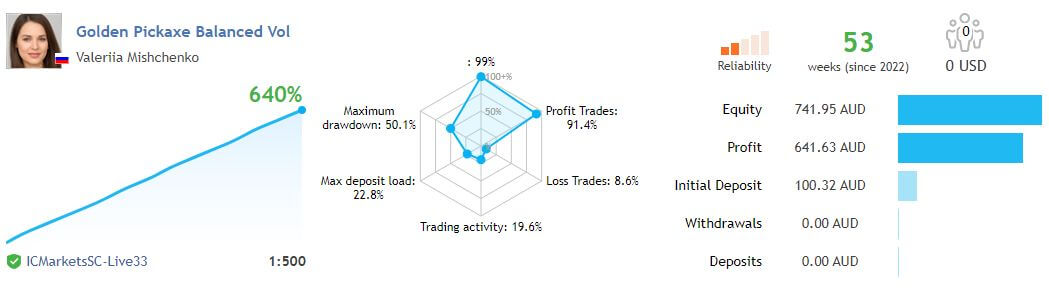
High performance results directly from using Golden Pickaxe EA myfxbook.
Let’s see the results based on performance:
Signal link: https://www.mql5.com/en/signals/1751383?source=Unknown

Other signal link profit 640% with 53 weeks: https://www.mql5.com/en/signals/1705254?source=Unknown
Signal link profit 218% with 54 weeks: https://www.mql5.com/en/signals/1693250?source=Unknown
Golden Pickaxe EA Settings
Golden Pickaxe EA must be attached to ONLY one XAUUSD M1 chart, need to give the EA access to the news list website and time server for news filter and time detection functionality to work correctly.
Let’s watch the video instructions for installing and using EA:
MM & Risk settings:
- Allow Opening a new Grid – on/off opening of new grids. It does not affect the already open grids.
- Lot-sizing Method – select the lot sizing method according to the risk you want to take: Fixed Lots will use fixed lot size from the “Fixed lot” parameter, Dynamic Lots will use ‘Dynamic Lot’ parameter, Deposit load will calculate lots based on deposit load%, and 4 predefined presets will calculate risk automatically for you.
- Fixed Lot – fixed trading lot for the initial trade.
- Dynamic Lot (Balance/Equity based) – balance/equity to be used per 0.01 lot.
- Deposit Load % – % of the deposit that will be totally used to open the initial trade.
You can watching How to video set Golden Pickaxe manual:
How to install and run the Golden Pickaxe EA Trading Bot in Metatrader 4?
- Open the Metatrader 4 platform
- From the top menu, click on “File”
- Now click on “Open Data Folder”
- Open the “MQL4” folder
- Open the “Experts” folder
- Copy the Golden Pickaxe EA v2.23 file here
- Then close and restart the MT4 platform
- Attach the Expert Advisor to the chart
Now, you are ready to start using the Golden Pickaxe EA MT4 v2.23 Without DLL!
If you have any questions regarding EA installation, you can view the information in the Help Center to assist you in installing the EA: Click to view
Golden Pickaxe EA Download
Link download Golden Pickaxe EA MT4 v2.23 Without DLL will be sent to your email after purchase.
Installation guide (if any) will be sent immediately via email after your purchase, or you can directly download it from the website, under the section: My account -> Download.
Updated October 03, 2024: Golden Pickaxe EA MT4 v2.23 Without DLL (Build 1422+) ( Without DLL )
Updated June 08, 2024: Golden Pickaxe EA MT4 v2.19 Without DLL For Build 1420 ( Without DLL )
Updated February 19, 2024: Golden Pickaxe MT4 v2.19 NoDLL ( Without DLL )
Updated January 21, 2024: Golden Pickaxe MT4 v2.19 ( Without DLL )
+ Expert :
- Golden Pickaxe EA v1.53.ex4
- Unlimited / NoDLL / Build New
- Free 1 Year Updates (If there is a new update, please check in the download on the forexeashop website or you can contact us via Email or Telegram Lucas Jason and provide proof of purchase, we will send you the update)
Shopping Guide and Important Information
We Accept Payment: Cryptocurrency, USDT, Binance Pay, Skrill, Paypal: Click to view
More payment methods please contact: Email or Telegram Admin.
Cryptocurrency, PayPal: Our website checkout system automated.
Memo: Your email + EA name
EA will be send to your email ASAP. The download link will be sent to your email within 5 minutes after the order is confirmed.
Some EAs will need to wait a few hours to up to 12 hours to receive the download link.
Please read and agree to the information below before purchasing our products:
Beginner traders should research and learn about trading before using any EAs.
Please make sure you understand the risks involved with trading and that past performance is no guarantee for future results. (EA could also make losses).
The product does not guarantee profits and demands resilience, patience, and a positive attitude in forex trading.
Before use, please test the EA on a demo account first.
Happy trading!


Reviews
There are no reviews yet.